Ollama + Fastify — On‑Prem LLM API Stack Guide
A practical stack guide showing how to combine Ollama (local/model runtime) with Fastify (Node.js API) to run an on‑prem inference API. Includes architecture, flow, deployment topology, observability, security boundaries, and a staged rollout plan.
Ollama provides a local model runtime and exposes a REST API (example endpoint shown in its docs at http://localhost:11434/api/chat), and Fastify is a high‑performance Node.js web framework intended for low overhead API layers. Together they form a coherent on‑prem inference stack: Fastify acts as the application API and request orchestrator while Ollama runs models and serves inference over its REST API (or a local socket where applicable).
This guide shows a pragmatic architecture, the request/data flow, integration boundaries, deployment topologies using containers or single‑host installs, observability options, security boundaries, and a four‑stage implementation plan you can apply to move from proof‑of‑concept to production. Evidence used in this guide is drawn from the official repositories and release metadata linked in the Sources section; inferred architecture or integration patterns are explicitly labeled.
Why combine Ollama and Fastify
- Ollama is distributed from its canonical repository which documents a local REST API for running chat/inference requests (example: POST to http://localhost:11434/api/chat) and publishes an official Docker image. See the Ollama repo for the REST API example and Docker mention Ollama canonical repository and the release notes Ollama latest GitHub release.
- Fastify is a Node.js web framework focused on low overhead routing, plugins, and high throughput. The Fastify repository includes clear examples for creating routes and starting a server; its README also contains a synthetic benchmark table for framework overhead. See Fastify canonical repository.
Combining them: keep inference and model lifecycle confined to Ollama (model management, local storage, runtime) and use Fastify as the service-facing API that performs application logic, authentication/authorization, request shaping, caching, telemetry, and routing to Ollama.
Architecture overview
At a high level the stack separates responsibilities:
- Ollama: model hosting, inference runtime, and model management (importing, running models). The repository documents both client libraries and a REST API and provides an official Docker image.
- Fastify: HTTP API layer that exposes application endpoints, enforces validation and auth, performs request/response shaping, and forwards inference requests to Ollama.
Architectural conclusion (INFERRED): the recommended integration is to run Ollama as a co‑located service (container or system service) that Fastify calls via HTTP on the host loopback interface. This inference is drawn from the Ollama README’s REST API example and the presence of a Docker image in its documentation.
Mermaid request flow
flowchart LR
  Client((Client)) -->|HTTPS| FastifyAPI[Fastify API]
  FastifyAPI -->|POST /v1/chat -> validate/auth| FastifyAuth[Auth & Validation]
  FastifyAuth -->|Forward inference request| OllamaAPI[Ollama REST API\n(http://localhost:11434)]
  OllamaAPI -->|Model inference| ModelStore[(Local model binaries)]
  OllamaAPI -->|Response| FastifyAPI
  FastifyAPI -->|Response| Client
  subgraph Observability
    FastifyAPI -->|Traces/Logs| OTEL[OpenTelemetry / Log exporter]
    OllamaAPI -->|Metrics/Logs| OTEL
endRequest and data flow
This section maps the functional flow and per‑component responsibilities.
Table: responsibilities (component vs responsibility)
| Component | Primary responsibilities |
|---|---|
| Client (browser, mobile, service) | Send application requests; receive responses; handle UI/UX and retries |
| Fastify API | Authentication/authorization, input validation (JSON Schema), rate limiting, caching, orchestration of multi‑step flows, logging, telemetry export, forwarding inference requests to Ollama |
| Ollama runtime | Model selection, model loading, inference, model lifecycle commands (import, run), local REST API for inference |
| Model Store (local disk / mounted volume) | Store model binaries and artifacts that Ollama loads (documented model import support in Ollama repo) |
| Observability stack | Collect logs, traces, and LLM metrics (examples of integrations are listed in the Ollama README) |
Table: example endpoints and what they do (integration-level)
| Fastify route | Purpose | Downstream call |
|---|---|---|
| POST /v1/chat | Application chat endpoint with auth and schema validation | POST http://localhost:11434/api/chat (Ollama) [see Ollama README] |
| POST /v1/embed | Return embeddings or vector data (app-level) | Could forward to Ollama if using a model that produces embeddings (Ollama supports models via its runtime) |
| POST /admin/models/import | Trigger model import (controlled admin endpoint) | Call Ollama model import APIs or run CLI operations (Ollama docs show import workflows) |
Architectural conclusion (INFERRED): the Fastify layer should be the only externally exposed service; Ollama should be reachable only from Fastify or from trusted hosts. This is inferred from Ollama's localhost REST example which suggests local/host‑bound deployment as the common pattern.
Integration boundaries and APIs
Key integration points (evidence from READMEs):
- Ollama REST API: README includes a working curl POST to http://localhost:11434/api/chat. Use that endpoint as the canonical downstream for inference requests from Fastify. Source: Ollama canonical repository.
- Fastify server: Fastify README contains examples for creating routes and starting the server (listen). Use Fastify’s route schema validation and plugin system to implement authentication, input validation, response serialization, and request logging. Source: Fastify canonical repository.
Integration boundary recommendations (explicit):
- Fastify → Ollama: synchronous HTTP calls for single‑turn inference. Keep calls short; implement timeouts on the Fastify HTTP client when calling Ollama.
- Admin operations: model import and lifecycle operations should be restricted to a separate admin channel (Fastify admin routes) or executed out‑of‑band by operator scripts that interact with the Ollama CLI or Docker image.
Deployment topology and options
The Ollama README documents an official Docker image and platform install paths (macOS, Windows, Linux). Fastify is a Node.js application you can run in a container, serverless function, or process manager. Below are three deployment topologies to consider.
Table: deployment topologies
| Topology | Description | When to choose |
|---|---|---|
| Single host (co‑located services) | Fastify and Ollama run on the same machine; Ollama listens on localhost; model files on local disk or mounted volume | Small teams, POC, environments needing local inference and data residency |
| Containerized (separate containers) | Fastify in one container, Ollama in another; containers on same host or same private network; model storage mounted as a volume | Standardized deployments, easier upgrades, container orchestrators like Docker Compose or Kubernetes |
| Multi‑host / scaled inference | Fastify horizontally scales; Ollama instances run per host or as dedicated inference nodes behind network controls; Fastify routes traffic to local Ollama or to a dedicated inference tier | High‑throughput deployments or when inference must be isolated on specialized hardware (GPU/accelerators) |
Important evidence: Ollama provides an official Docker image (mentioned in the repository README) and a REST example using port 11434; Fastify demonstrates how to listen and bind to interfaces in its README. See sources: Ollama canonical repository, Fastify canonical repository.
Deployment notes (INFERRED):
- Use host networking or loopback binding for low‑latency communication between Fastify and Ollama when on the same host.
- When using containers, prefer mounting model storage volumes into the Ollama container so models persist across restarts; this pattern is implied by the presence of model import and Docker in the Ollama docs.
Observability and monitoring
The Ollama README lists several observability integrations and projects (Opik, OpenLIT, Lunary, Langfuse, HoneyHive, MLflow tracing) as ecosystem tooling. Fastify ships with structured logging via Pino in its examples and recommends telemetry via plugins.
Practical observability points:
- Log shape: Fastify promotes JSON structured logs (Pino). Use a consistent log format for request id, route, user id (where allowed), and inference latency.
- Tracing: Export traces from Fastify and annotate the span that contains the call to Ollama. This will let you see end‑to‑end latency.
- LLM metrics: Capture model, prompt size, token counts or model response time where Ollama exposes this (instrumentation approach depends on Ollama runtime metrics; the Ollama repo lists observability projects as integrations).
Table: observability tooling referenced in Ollama README
| Tool | Role (as referenced in Ollama README) |
|---|---|
| Opik | Debug/evaluate and monitor LLM applications |
| OpenLIT | OpenTelemetry‑native monitoring for Ollama and GPUs |
| Lunary | LLM observability with analytics and PII masking |
| Langfuse | Open source LLM observability |
| HoneyHive | AI observability and evaluation for agents |
| MLflow Tracing | LLM tracing support (automatic tracing mentioned) |
Security boundaries and best practices
Only make the Fastify API publicly reachable. Keep Ollama reachable only from Fastify or from operator/admin hosts. The Ollama README’s localhost REST example provides evidence that a local binding is expected for many common setups.
Security recommendations (general best practice; not prescriptive to any specific version):
- Network controls: bind Ollama to localhost or an internal network interface; configure firewall rules or container network policies so only trusted hosts can reach Ollama.
- API gateway: use Fastify plugins or a fronting API gateway to enforce authentication, rate limiting, and IP allowlists.
- Authentication: implement token‑based auth or mTLS between Fastify and any external callers. Fastify supports plugins and hooks to centralize auth logic.
- Secrets and models: keep model binaries and any secret artifacts under restricted filesystem permissions and mounted volumes.
Staged implementation plan
This plan assumes you already have a Node.js environment for Fastify and an environment where you can run Ollama (local machine, server, or container host). The plan is intentionally incremental so you can validate at each stage.
Stage 0 — Preparation
- Read the Ollama REST API example in the Ollama repository and confirm you can run Ollama locally or pull the official Docker image. Reference: Ollama canonical repository.
- Create a Fastify skeleton using the Fastify README examples to confirm the app can start and respond. Reference: Fastify canonical repository.
Stage 1 — Proof of concept (single host)
- Run Ollama locally as indicated by its README and confirm the curl example against http://localhost:11434/api/chat works.
- Implement a Fastify route POST /v1/chat that receives client messages, validates payload with JSON Schema (Fastify supports schema), forwards an HTTP request to the Ollama REST API, and returns the result.
- Add simple logging with Pino and a request id.
Stage 2 — Hardening and telemetry
- Add timeout handling on the Fastify side for calls to Ollama; implement retry policies only for idempotent or safe operations.
- Integrate OpenTelemetry or your APM; ensure traces show the Fastify→Ollama span.
- Configure access controls on Fastify (authentication) and restrict network access to Ollama.
Stage 3 — Containerized deployment and model lifecycle
- Containerize Fastify and run Ollama in a container or as a managed service on the same host; mount a persistent volume for models into the Ollama container (Ollama README documents Docker support).
- Implement an admin route or operator process for importing models (follow Ollama import docs).
- Add observability exporters and dashboards for LLM metrics.
Stage 4 — Scale and separation
- If load increases, evaluate separating inference nodes (dedicated Ollama hosts) from Fastify compute nodes. Route requests so Fastify prefers a local Ollama instance when available, or round‑robins to dedicated inference nodes.
- Add load testing and capacity planning. Fastify README includes discussion on benchmarking the framework overhead.
Decision -- Action checklist
- Decide if Ollama will run co‑located with Fastify or on separate inference nodes. (If low latency and single host is required, co‑locate.)
- Confirm model persistence strategy: local disk volume vs. shared storage mounted into Ollama container.
- Implement Fastify route validation and timeouts before any production traffic flows to Ollama.
- Place Ollama behind network controls; do not expose its REST API publicly.
- Add tracing from Fastify into the Ollama call to capture end‑to‑end latency.
- Choose an observability integration listed in the Ollama README (Opik, OpenLIT, Lunary, Langfuse) and instrument accordingly.
Evidence, assumptions, and limitations
- Ollama repository README (contains a curl example for the REST API at http://localhost:11434/api/chat and mentions an official Docker image): https://github.com/ollama/ollama
- Ollama release metadata (latest release v0.31.2, published 2026‑07‑06): https://github.com/ollama/ollama/releases/tag/v0.31.2
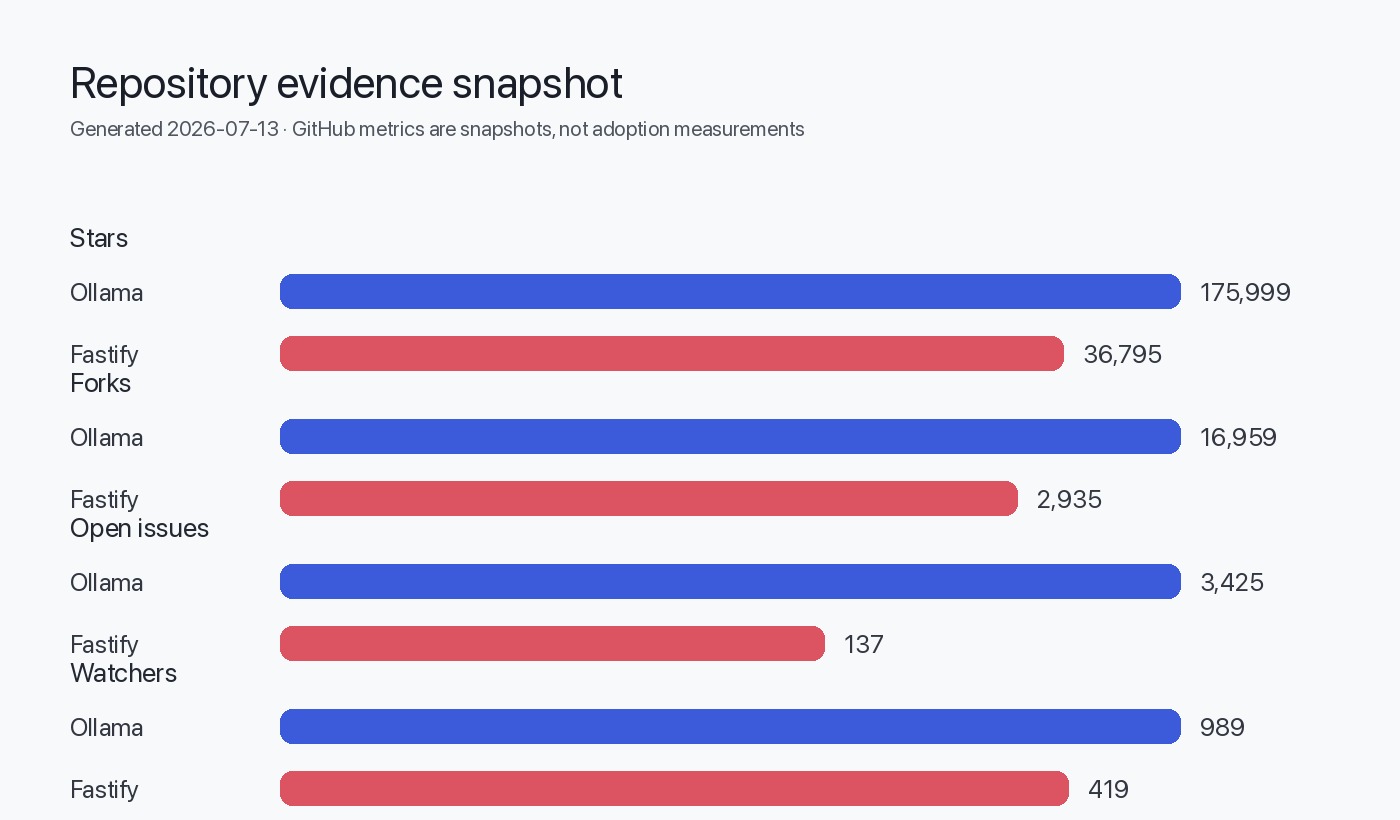
- Fastify repository README (includes example server code, discussion of logging and JSON Schema validation, and a synthetic benchmark table): https://github.com/fastify/fastify
- INFERRED: Ollama is commonly run as a local service and is intended to be called from a co‑located application layer — inference based on the localhost REST example in the Ollama README.
- INFERRED: Best practice is to expose only Fastify to untrusted networks while keeping Ollama reachable only from trusted application hosts; this is a deployment pattern derived from the evidence and general network security best practices, not a documented requirement in the README.
Limitations:
- This guide does not prescribe exact resource sizing, GPU usage, or model‑specific memory requirements; those depend on the models you run and your traffic profile. The Ollama README discusses model types and library support but does not define universal resource numbers.
- Security and compliance decisions should be validated against your organization’s policies and a dedicated threat model. This guide synthesizes patterns from public README content and does not replace an in‑depth security review.
Data retrieval/generation date: The repository and release metadata referenced above are current as of 2026‑07‑13 (the document generation date). Where freshness matters (e.g., latest release), check the linked repository for updates.
Sources
- Ollama canonical repository: https://github.com/ollama/ollama
- Ollama latest GitHub release (v0.31.2): https://github.com/ollama/ollama/releases/tag/v0.31.2
- Fastify canonical repository: https://github.com/fastify/fastify
FAQ
Can I call Ollama directly from clients (browsers or mobile apps)?
The Ollama README shows a localhost REST example; the recommended pattern in this guide is to avoid exposing Ollama directly to public clients. Instead, expose a Fastify API that implements auth, validation, and rate limiting and forwards safe requests to Ollama.
Does Ollama provide a Docker image? Where is that documented?
Yes — the Ollama README references an official Docker image and includes installation options. See the Ollama repository for details: https://github.com/ollama/ollama.
Which Fastify features are most useful when integrating with an LLM runtime?
Use Fastify’s JSON Schema validation for input sanitization, its plugin system to centralize auth and telemetry, and its high‑performance routing for low overhead when forwarding requests to the runtime. These features are described in the Fastify README at https://github.com/fastify/fastify.
What observability tools are recommended for tracking inference performance?
The Ollama README lists several ecosystem projects for LLM observability (Opik, OpenLIT, Lunary, Langfuse, HoneyHive, MLflow Tracing). Start with structured logs and traces from Fastify, then add LLM‑specific metrics exported from the runtime.
Is there an example of an Ollama REST request I can use to test integration?
The Ollama README includes a curl example that posts to http://localhost:11434/api/chat; use that as the canonical quick test when running Ollama locally. See the Ollama repository for the exact example.
What deployment topology should I use for production?
Choose based on scale and operational constraints. Single host co‑location is fine for POC/local inference. Containerized setups simplify upgrades and reproducibility. For high throughput, consider separating inference nodes. This guide provides a comparison table and staged plan to help you decide.