Migrate from WooCommerce to Saleor — Decision & Execution Guide
Practical decision and execution guidance for teams considering a migration from WooCommerce (WordPress plugin monorepo) to Saleor (headless GraphQL commerce).
This guide helps engineering teams decide whether and how to migrate an existing WooCommerce store into Saleor, and provides a practical, phased execution plan with test strategy, data and API considerations, rollback gates, and explicit cases where migration is not justified. It synthesizes repository facts and architecture signals from the official repositories for WooCommerce and Saleor and maps them to typical migration concerns for product catalogs, orders, customers, extensions, and integrations.
Short answer: choose Saleor if you need a composable, API-first (GraphQL) commerce backend and are prepared to reimplement WordPress-specific plugins, theming, and PHP-based extensions. Stay with WooCommerce if your stack, extensions, or business processes are tightly coupled to WordPress, you depend on many PHP plugins that would be costly to reimplement, or you need a low-friction route for small stores without dedicated engineering resources.
Repository facts and retrieval date
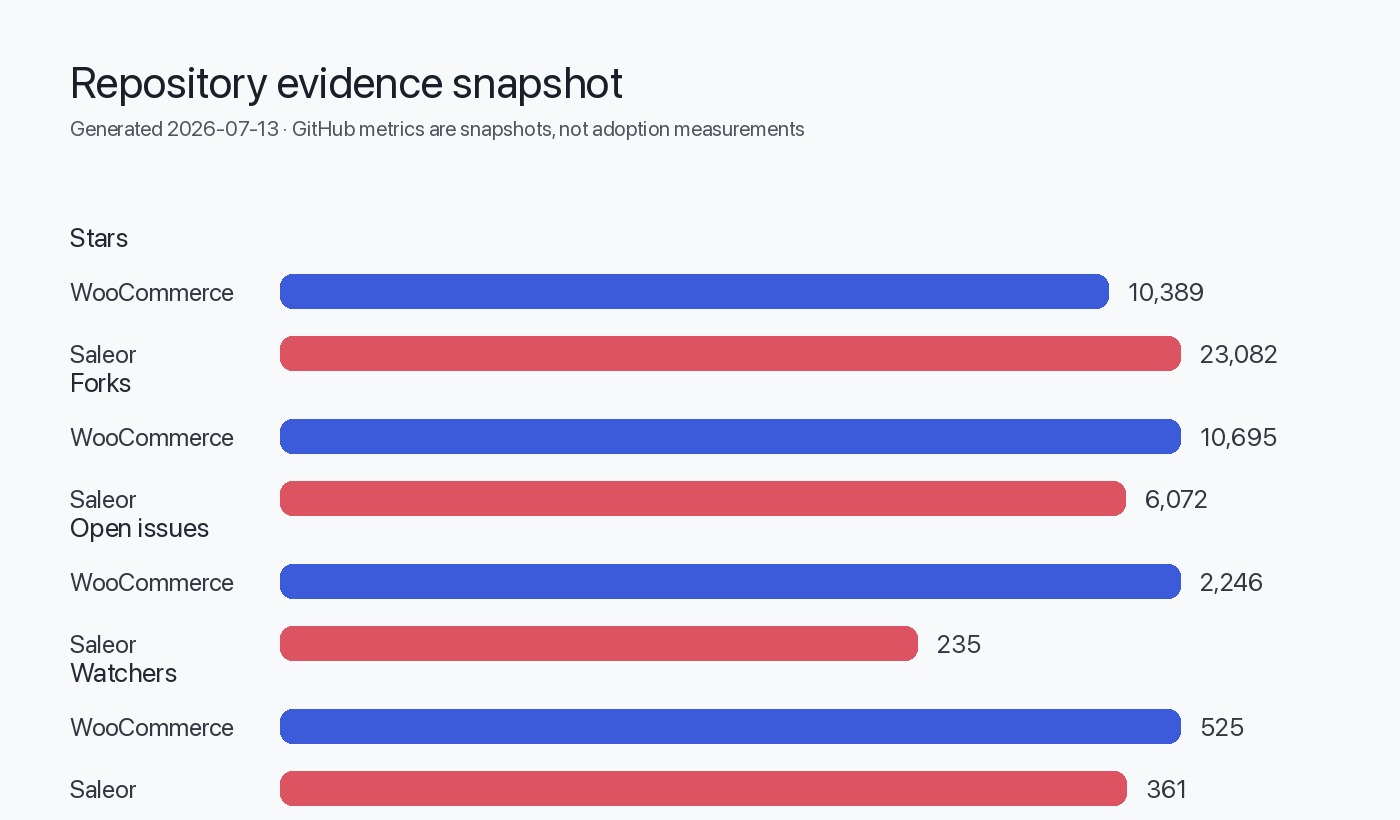
- WooCommerce canonical repository: https://github.com/woocommerce/woocommerce (metadata retrieved 2026-07-13) — monorepo with plugins, PHP plus JS tooling; README documents PHP 7.4+ and a PNPM-based build flow. See the repo for details.
- WooCommerce latest release referenced: 10.9.4 (published 2026-07-07) [release page cited].
- Saleor canonical repository: https://github.com/saleor/saleor (metadata retrieved 2026-07-13) — API-first, GraphQL-native, headless commerce written in Python; README describes an API-only architecture and points to headless storefront/dashboard projects.
See Sources at the end for links to these repositories and releases.
Decision summary and suitability assessment
Use these decision signals to decide whether to move from WooCommerce to Saleor.
Table: suitability quick-check
| Criterion | Strong signal for Saleor | Strong signal for staying on WooCommerce |
|---|---|---|
| Desire for API-first/GraphQL backend and headless storefront(s) | Yes — Saleor is described as GraphQL-native and API-only in its README (Saleor repo). | No |
| Core business logic implemented as WordPress plugins, short-term migration budget limited | No | Yes — WooCommerce is packaged as WordPress plugins per the repo README (WooCommerce repo). |
| Need to decouple front-end and scale API endpoints independently | Yes | Maybe — WooCommerce is a plugin ecosystem running on WordPress/PHP; architecture inferred as plugin/monolith style (see section below). |
| Team expertise in Python/Django + GraphQL vs PHP/WordPress | Yes (Python + GraphQL) | Yes (PHP + WordPress) |
| Reliance on specific WooCommerce extensions/themes not replaceable | No | Yes |
This table synthesizes signals from project READMEs and repository structure. Architectural conclusions that are inferred from READMEs or repository structure are explicitly labeled where used.
- From the WooCommerce README and repository structure we infer that the project is delivered as WordPress plugins within a monorepo and relies on the WordPress plugin architecture and PHP runtime. This is an inferred conclusion based on README content and repository layout.
- From the Saleor README we infer an API-only, GraphQL-first, headless architecture that separates backend, storefront, and dashboard into distinct components. This is also inferred from the README and linked storefront/dashboard repos.
Caveat: these are architectural inferences from repository documentation rather than runtime telemetry.
Inventory and discovery checklist
Before you plan work, audit the current store. Run a discovery pass using the following inventory table; treat it as required input for sizing and timeline estimates.
Table: discovery inventory (fill during discovery)
| Category | Questions to answer | Example data points to collect |
|---|---|---|
| Platform & runtime | WordPress & WooCommerce versions, PHP version, hosting type | e.g., WordPress 6.x, WooCommerce plugin 10.9.4, PHP 7.4+ (see WooCommerce README) |
| Extensions & plugins | List of installed plugins (premium + custom) and whether source is available | plugin name, vendor, purpose, hooks used, DB tables created |
| Themes & storefront | Is storefront a custom WP theme or page-builder site? | theme files, template overrides, shortcodes, WP hooks used |
| Data volumes | Product SKUs, SKUs with variants, orders, customers, attachments | counts of products, images, orders, customer records |
| Integrations | Payment gateways, shipping, ERP, PIM, analytics | endpoints, webhooks, authentication method |
| Customizations | Any PHP code, WP filters/actions, database migrations | plugin code locations, custom DB tables |
| Operational needs | SLAs, peak traffic, multi-channel, multi-currency | traffic spike profile, scale requirements |
Collecting the inventory establishes what must be migrated (data) and what must be reimplemented (custom logic, integrations, storefronts).
Export lists of active plugins and a plugin file tree from the WordPress install; that output is the canonical compatibility list for migration scoping.
Compatibility risks and mapping matrix
The core technical gap when migrating from WooCommerce to Saleor is runtime and extension model: WooCommerce is delivered as WordPress plugins (PHP) and Saleor is an API-first Python GraphQL application. That implies risks and required rework in several areas.
Table: compatibility risk mapping
| Surface | Risk | Mitigation / Mapping strategy |
|---|---|---|
| Themes / storefront | WooCommerce storefronts are typically implemented as WordPress themes and templates; Saleor expects headless storefronts (separate repo). | Rebuild storefront using a front-end framework that consumes Saleor GraphQL APIs (Saleor provides example storefronts). Consider incremental parallel-run with headless storefront for specific channels. |
| Plugins & extensions | PHP plugins (payment, shipping, promotions) rely on WP hooks and PHP code. | For each plugin: 1) replace with existing Saleor app or integration, 2) implement custom business logic as a separate microservice or Saleor app that integrates via GraphQL, webhooks, or middleware. |
| Data model differences | Product, inventory, order schemas differ; custom product attributes in WooCommerce may map differently in Saleor. | Define canonical data model for migration; transform exports to Saleor schema; plan reconciliation for attributes, SKUs, variants, taxes. |
| Payment gateways | Some WooCommerce payment plugins may not exist as ready Saleor integrations. | Use payment gateway providers with server-side APIs; implement payment service that talks to Saleor payment flow or use Saleor's payment API extension points. |
| SEO & URLs | Existing SEO URLs and content hosted in WordPress may need redirects. | Preserve SEO by exporting slugs and mapping redirect rules at CDN/load-balancer level; implement server-side redirects for existing URLs. |
| Webhooks & integrations | Existing integrations triggered by WP actions will not fire for Saleor. | Re-implement integrations to consume Saleor events/webhooks or use middleware to forward events during cutover. |
Do not assume 1:1 mapping for plugin behavior. Any plugin that modifies order flows, tax calculations, or payments must be validated end-to-end in a test environment before cutover.
Phased migration plan (high level) with Mermaid flow
Phases: Assess → Prototype → Parallelize → Migrate data → Cutover → Stabilize.
flowchart TD
  A[Assess & Inventory] --> B[Prototype key flows]
  B --> C[Build integrations & storefront]
  C --> D[Parallel validation (shadow/dual-write)]
  D --> E[Data migration dry runs]
  E --> F[Cutover decision gate]
  F --> G[Cutover & freeze writes to WooCommerce]
  G --> H[Final migration & switch traffic]
  H --> I[Post-cutover validation & monitoring]
  I --> J[Stabilize & retire old platform]
Phase details
- Assess & Inventory (2–4 weeks typical for mid-sized stores)
- Complete the Inventory table above.
- Identify critical plugins and integrations; classify as Replace / Reimplement / Keep (through middleware).
- Prototype key flows (2–6 weeks)
- Implement a minimal Saleor deployment (local or cloud) and a sample storefront that implements: product listing, product detail, checkout, order creation, and a single payment gateway integration. Saleor README points to storefront and dashboard repositories for examples (Saleor repo).
- Validate that core business flows can be implemented with Saleor APIs.
- Build integrations & storefront (several sprints)
- Reimplement or replace plugins as apps/microservices integrating with Saleor via GraphQL/webhooks.
- Rebuild storefront or adapt an existing headless storefront.
- Parallel validation (shadow or dual-write)
- Run Saleor in parallel: replicate catalog and simulate or mirror traffic (read-only for live orders) to validate order handling, inventory reconciliation, and webhooks.
- Data migration dry runs
- Export product, customer, order data from WooCommerce and write transformation scripts into Saleor schema; run dry-runs in staging.
- Cutover decision gate
- Only proceed if test scenarios, reconciliation thresholds, and performance baselines are met (see Test strategy).
- Cutover & final migration
- Put WooCommerce into write-freeze (or enable dual-write if you have an idempotent sync layer). Run final migration for delta changes and switch storefront traffic to the new storefront.
- Post-cutover stabilization
- Monitor errors, reconcile orders/customers, disable old cron hooks, and decommission WP-specific services on a controlled timeline.
Test strategy and verification gates
Testing is the safety net for this migration. Organize tests into unit, integration, contract, performance smoke, and end-to-end acceptance.
Test matrix (examples)
| Test type | Scope | Acceptance criteria | Responsible |
|---|---|---|---|
| Unit tests | Data transformation scripts | All transforms have unit coverage for edge cases | Devs |
| Integration tests | Payment gateway, shipping, ERP sync | Orders created in Saleor produce same downstream effects (ledger entries, shipping labels) as WooCommerce | Integrations team |
| Contract tests | GraphQL APIs consumed by storefront | GraphQL schema queries used by storefront return expected fields and types | API team |
| End-to-end (E2E) | Checkout, payment, order lifecycle | E2E flows succeed for sample SKUs and coupon scenarios | QA |
| Performance smoke | Catalog browse and checkout under expected load | Response latencies within agreed SLAs for critical endpoints | SRE |
Verification gates (go/no-go) for cutover
- All critical E2E scenarios pass in staging for three consecutive test runs.
- Data reconciliation: product counts, inventory totals, and sample order checks match within an agreed delta threshold.
- Integrations are verified with production sandboxes (payment, shipping) and webhooks are delivered reliably.
- Monitoring and alerting are in place for errors and latency post-cutover.
Automate data reconciliation checks (row counts, checksum on product slugs and inventory sums) and run them as part of every dry-run to quantify migration correctness.
Data, API, and integration concerns
Data model and export
- WooCommerce stores product, order, and customer data in WordPress tables and plugin-specific tables. Export methods vary; use WP-CLI exports or database dumps as discovery outputs.
- Saleor expects a different schema (product variants, channels, GraphQL types). Plan ETL scripts that map fields and transform attachments (images) to Saleor storage.
API differences and integration patterns
- WooCommerce extends WordPress PHP runtime with hooks and plugins; custom logic often runs inside the same process. In contrast, Saleor is API-only and exposes business functionality via GraphQL and webhooks (inferred from Saleor README).
- Strategy: move in-process custom logic into external apps or services that integrate via GraphQL mutations/subscriptions or via asynchronous webhooks.
Handling payments and sensitive data
- Payment data handling often keeps card data with PSPs. Reuse payment providers’ server-side SDKs and adapt the payment flow to Saleor's payment extension points. Validate PCI compliance posture during migration and ensure tokens and payment records are migrated only per PSP guidance.
Search and SEO
- If you currently rely on WordPress for SEO-managed content (pages, blogs, product descriptions with shortcodes), plan for content migration. Keep URL preservation and create 301 redirects for legacy product and category URLs.
Rollback gates and cutover criteria
Rollback gates are explicit conditions under which you will revert to WooCommerce after attempting cutover. Establish these before migration and automate detection where possible.
Rollback criteria (examples)
- Production error rate for checkout or order creation exceeds threshold (e.g., X% — define per SLA) for Y minutes post-cutover.
- Downstream systems (payment/fulfillment) report critical failures that cannot be mitigated within the rollback window.
- Reconciliation mismatch exceeds allowable delta after final migration run.
Cutover checklist (must be green before switch)
- Final data migration dry-run done and validated.
- Integrations in production or in verified sandboxes.
- Staging E2E tests passed repeatedly.
- Monitoring, alerts, and rollback plan reviewed and communicated.
Do not remove write access to the old system until the final migration has completed and reconciliation is verified. If you must freeze writes, communicate clearly to stakeholders and automate delta capture.
When migration is not justified
Migration to Saleor is not justified in these cases:
- Your store depends on many proprietary WordPress/WooCommerce plugins that have no acceptable replacement in Saleor and the cost/time to reimplement them exceeds business benefit.
- Your team lacks bandwidth or experience to rebuild storefronts, integrations, and to operate a headless, API-first stack (Saleor is headless by design; see README).
- Your business model is simple (single-store, low traffic) and the current WooCommerce implementation meets requirements without frequent breaking changes or scaling needs.
If the main driver is a desire for incremental improvements without a large engineering investment, consider optimizing the current WooCommerce stack (caching, host scaling, plugin audit) instead of a full migration.
Decision / Action checklist
Evidence, assumptions, and limitations
- The guide references repository metadata and READMEs for both projects: WooCommerce repository and latest release information ([WooCommerce repo], [WooCommerce release]) and Saleor repository ([Saleor repo]). These are the sources listed in the Sources section. The repository metadata was retrieved on 2026-07-13.
- Saleor’s architecture is API-first and GraphQL native; this is stated in the Saleor README and used as the basis for integration recommendations.
- WooCommerce is distributed as a WordPress plugin monorepo and requires PHP runtime; this is stated in the WooCommerce README and used to infer plugin-dependency risks.
- No internal telemetry, customer-specific plugin lists, or environment details were available; the guide assumes a typical WooCommerce install that uses plugins and themes as described in the README.
- This guide does not provide step-by-step code for migrations because specifics vary per store: plugin list, custom code, and hosting environment drive the work.
- The guide does not include performance benchmarks or cost modeling. Those require environment-specific measurement and were not available from the supplied sources.
Sources
- WooCommerce canonical repository: https://github.com/woocommerce/woocommerce
- WooCommerce latest GitHub release (10.9.4): https://github.com/woocommerce/woocommerce/releases/tag/10.9.4
- Saleor canonical repository: https://github.com/saleor/saleor
FAQ
Can I migrate product data automatically from WooCommerce to Saleor?
Yes—you can export product, customer, and order data from WooCommerce and transform it to Saleor’s schema. Transformations are often required for variants, attributes, and custom fields. Run dry-runs and automated reconciliation before final cutover.
Will my WooCommerce plugins work in Saleor?
Not directly. Plugins that rely on WordPress hooks or execute PHP in-process must be reimplemented as external integrations, Saleor apps, or replaced with equivalent services that integrate via Saleor’s GraphQL API or webhooks.
Is Saleor a hosted service or self-hosted?
Saleor is an open-source, API-first core that you can self-host; the project README also references a cloud offering and example storefronts. Check Saleor documentation and repositories for deployment options.
How long does a migration typically take?
Duration varies based on plugin count, customizations, and data volume. Use a discovery inventory to estimate scope: a proof-of-concept can take weeks; a full migration may take several months.
How do I preserve SEO when migrating?
Preserve or map slugs during migration, and implement 301 redirects for legacy WordPress URLs at the CDN, edge, or web server that fronts your storefront.
Can I run WooCommerce and Saleor in parallel during migration?
Yes. Run Saleor in parallel for testing and use dual-write or event-mirroring strategies to validate flows. Ensure reconciliation and idempotency in your sync approach.
Where can I find example storefront code for Saleor?
The Saleor repository README links to storefront and dashboard repositories with example storefronts and starters; see the Saleor canonical repository.