React + SuiteCRM: Production Stack Guide for CRM UIs
Practical architecture and implementation plan for using React as a modern UI layer on top of SuiteCRM, including integration boundaries, deployment topology, observability, security, and rollout steps.
Executive answer
This guide explains how to pair React as a dedicated frontend with SuiteCRM as the canonical CRM backend, producing a coherent stack that separates UI concerns from core business data and workflows. The combination treats SuiteCRM as the authoritative data and process engine (PHP + LAMP components) while React delivers a modern componentized UI that consumes SuiteCRM data via HTTP/JSON APIs or an intermediary adapter layer. Evidence used for this guidance is the React canonical repository and release notes and the SuiteCRM repository README and installation guidance; see Sources.
If you want a practical rollout: start by introducing a small React-driven widget (dashboard panel or contact record viewer) that calls SuiteCRM’s data endpoints (or a lightweight adapter). Progress through an authenticated API proxy and standardized error/telemetry handling, then migrate high-interaction pages to React in stages. This reduces risk because SuiteCRM remains the system of record while React handles client-side rendering, state management, and progressive enhancement.
How these two technologies complement one another
React (frontend) and SuiteCRM (CRM backend) are conceptually complementary:
- React is a JavaScript UI library for building component-based user interfaces. This is stated in the React repository README and release material. See the React repository for details on the library and its latest release at time of writing React repository and React v19.2.8 release notes.
- SuiteCRM is an open-source CRM application implemented in PHP and designed to run on a LAMP-style stack (Apache/IIS + PHP + MySQL/MariaDB). The SuiteCRM README and installation notes describe system requirements and deployment expectations. See the SuiteCRM repository for details SuiteCRM repository.
Architecturally, this leads to a two-tier separation: SuiteCRM remains the canonical data and workflow layer; React becomes the presentation layer that queries and manipulates SuiteCRM data through defined integration boundaries.
Architecture overview
At a high level the stack has three logical layers:
- Presentation: React single-page application (SPA) or multi-page partials. Responsible for component rendering, client-side routing, and UX interactions.
- Integration/API layer: either SuiteCRM's existing HTTP endpoints, custom REST endpoints exposed by SuiteCRM, or a dedicated API proxy/service that normalizes SuiteCRM data into JSON suited for the React client.
- SuiteCRM core: PHP application, database (MySQL/MariaDB), file store, and background jobs. This layer enforces business rules and remains the system of record.
Table: Responsibilities by layer
| Layer | Responsibilities | Evidence source / inference |
|---|---|---|
| React (Presentation) | UI rendering, client-side state, input validation, offline UX, progressive enhancement | Fact: React described by its repo as a UI library (React repo). |
| Integration/API layer | Translate CRM data to JSON, auth proxy, rate limiting, validation, caching | Inferred: SuiteCRM README describes PHP-based app and recommends common LAMP hosting. Many integrations require an adapter—this is an implementation inference. (SuiteCRM repo) |
| SuiteCRM core | Business logic, workflows, storage, audit trails, scheduled jobs | Fact: SuiteCRM README lists system requirements and that it's PHP-based with MySQL/MariaDB and Apache/IIS. (SuiteCRM repo) |
Architectural conclusions explicitly labeled as inferred
- Inferred: A neutral API adapter or proxy between a modern React SPA and SuiteCRM will simplify data modeling and security because SuiteCRM 7 (per README) is a PHP application built for LAMP environments rather than a headless JSON-first backend. The README lists LAMP compatibility, so architecting an adapter is a pragmatic inference to reconcile SuiteCRM's traditional PHP architecture with a JSON-driven frontend. Source: SuiteCRM repository README.
Request and data flow
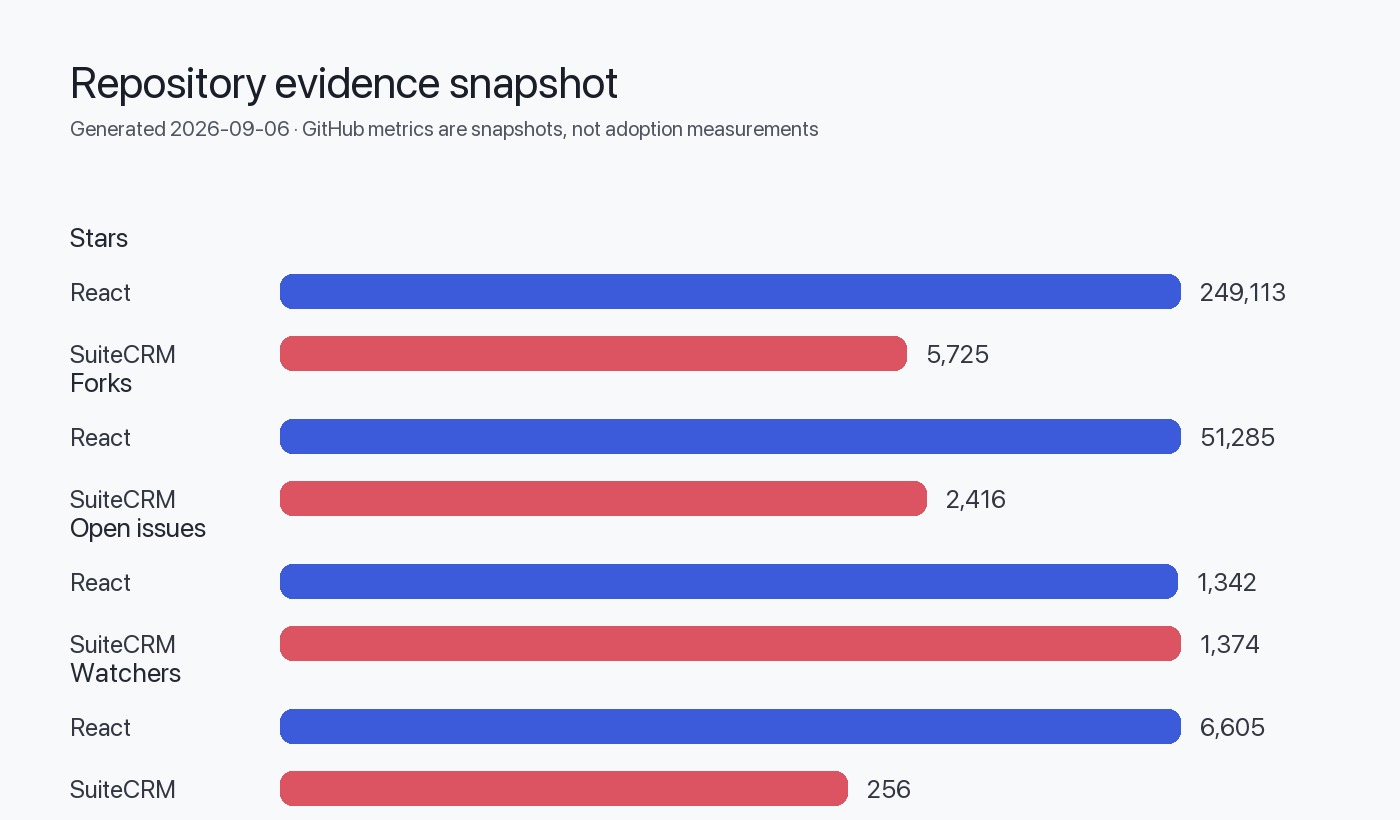
Place the data image here to visualize mappings and latency-sensitive paths.
Typical request flow for a React view that shows a contact record:
- Browser loads React app (served from CDN or app server).
- React requests contact data from /api/contacts/:id on the integration layer (CORS, JWT or cookie auth).
- Integration layer translates request into SuiteCRM-compatible call (internal HTTP call or direct DB query, depending on your chosen pattern).
- SuiteCRM returns data; integration layer normalizes, caches, and transforms it into an API-friendly JSON shape.
- React receives JSON, updates components and local state, and renders the UI.
- User actions (edits, stage transitions) post back through the same integration layer to SuiteCRM; SuiteCRM triggers workflow/business logic and returns result/status.
Mermaid diagram of the flow
flowchart LR
  Browser[Browser / React app]
  CDN[CDN / Static assets]
  API[Integration API / Proxy]
  Suite[SuiteCRM PHP app]
  DB[(MySQL / MariaDB)]
  Auth[Auth provider (OAuth/JWT/LDAP)]

  Browser -->|load assets| CDN
  Browser -->|GET /api/contacts/:id| API
  API -->|internal request| Suite
  Suite -->|SQL queries| DB
  Suite -->|response| API
  API -->|JSON response| Browser
  Browser -->|auth token| Auth
API -->|validate token| AuthIntegration boundaries and patterns
Three pragmatic integration patterns (from low to higher coupling):
- Embedding widgets: Inject small React components (widgets) into SuiteCRM pages using script tags and a minimal DOM mount. This keeps SuiteCRM UI but modernizes small parts.
- API adapter (recommended intermediate): A separate service that exposes stable JSON endpoints tailored for the React UI. The adapter talks to SuiteCRM via its internal APIs, database, or custom PHP entry points.
- Full headless replacement: Treat SuiteCRM strictly as data/process engine and build the entire UI in React. This requires careful mapping of SuiteCRM workflows and may require deeper SuiteCRM customization.
Table: Integration patterns at a glance
| Pattern | Coupling | Work required | When to choose |
|---|---|---|---|
| Widget embedding | Low | Low — add scripts and DOM hooks | When you need small UX improvements quickly |
| API adapter | Medium | Moderate — build adapter, map fields | When you want a modern SPA with minimal backend drift |
| Full headless | High | High — port workflows and possibly modify SuiteCRM | When you need full control of UX and are ready for sustained maintenance |
Integration boundary checklist
- Authentication: Decide on cookie-based sessions vs token-based authentication (JWT/OAuth). Ensure adapter can validate sessions or exchange tokens.
- Field mapping: Map SuiteCRM modules/fields to JSON shapes the React UI expects.
- Workflows/events: Identify SuiteCRM-driven workflows that must trigger UI updates (webhooks, polling, or real-time notification service).
- Error handling: Unified error shapes from adapter to client for consistent UX and telemetry.
Deployment topology
Use a separation of concerns to allow independent scaling and lifecycle management.
Table: Deployment components and recommendations
| Component | Typical deployment | Notes |
|---|---|---|
| React app | CDN (static assets) + edge caching | Deploy via CI to object storage + CDN; invalidation on release |
| Integration API / Adapter | Container (Kubernetes) or managed app service | Stateles sersvice; scale based on API traffic |
| SuiteCRM app | LAMP host(s) behind load balancer | Per SuiteCRM README, tested on Apache/IIS with PHP 8.x and MySQL/MariaDB (SuiteCRM repo) |
| Database | Managed MySQL/MariaDB cluster with backups | DB is system of record—use backups and replication |
| Background jobs | Worker processes (cron, queue workers) | SuiteCRM uses scheduled tasks; retain existing job runners |
| Observability | Centralized logs, metrics, tracing | Instrument adapter and React for errors and performance |
Deployment topology (example):
- Static React assets deployed to a CDN for global delivery.
- Integration API deployed as containers (Kubernetes) in the same region as SuiteCRM to minimize latency.
- SuiteCRM PHP app and DB deployed in private network; API communicates over internal network.
- Optional caching layer (Redis or HTTP cache) between integration API and SuiteCRM for read-heavy endpoints.
Observability, logging, and telemetry
Key signals to collect
- Client-side errors and performance: Sentry-style error logs, RUM for largest contentful paint and interaction times.
- API latency, error rates, and throughput: instrument the integration API with metrics (histograms for latency, counters for status codes).
- SuiteCRM health: PHP error logs, application error counters, database replication lag, and queue backlog.
- Audit trails: preserve SuiteCRM’s built-in audit logs for business changes.
Table: Observability mapping
| Signal | Where to collect | Purpose |
|---|---|---|
| JS exceptions | Client (browser) | Fix UI bugs and regressions |
| Page load & interaction metrics | Client RUM | UX performance monitoring |
| API latency & errors | Integration API metrics | SLA and troubleshooting |
| PHP errors and logs | SuiteCRM host logs | Backend errors and debugging |
| DB metrics | DB monitoring | Capacity planning and incident response |
Instrument the integration API to propagate request IDs to the client so traces can be correlated across systems. Keep sampling sensible for high-volume endpoints.
Security boundaries and considerations
Practical security boundaries for this stack:
- SuiteCRM remains system of record and should be placed in a private network with limited inbound access.
- The integration API should be the only component allowed to query SuiteCRM internals directly; do not expose SuiteCRM internals to the public internet.
- Authentication flow: prefer centralized auth (OAuth/OIDC) or token exchange via the adapter. If you must use SuiteCRM sessions, the adapter should validate and translate them into tokens the React app consumes.
- Input validation: defend at both layers. Client validation is UX-focused; the adapter and SuiteCRM must enforce business validation and authorization.
- Data residency and compliance: treat SuiteCRM data per your organization’s policy; ensure backups and logs comply with retention/privacy rules.
Security boundary checklist
- Harden SuiteCRM host OS, PHP, and web server per standard best practices.
- Place database in private subnets and restrict access to authorized application hosts.
- Use TLS everywhere: browser->API, API->SuiteCRM (internal TLS), database connections.
- Enforce least privilege for API credentials and database users.
Staged implementation plan (6 stages)
- Assessment and mapping (2–4 weeks)
- Inventory SuiteCRM modules, workflows, and data shapes needed by UI teams.
- Identify high-value pages and user journeys for React modernization.
- Proof of concept (2–6 weeks)
- Build a small React widget (read-only) and an adapter endpoint for one SuiteCRM module to validate integration approach.
- Validate auth and CORS setup.
- Core adapter and API design (4–8 weeks)
- Implement a robust integration API with standardized JSON shapes, pagination, and error formats.
- Add caching for read-heavy endpoints.
- Migrate critical UI views (8–16 weeks, iterative)
- Move high-interaction pages (dashboards, contact edit screens) to React incrementally.
- Maintain feature parity with SuiteCRM workflows.
- Hardening and observability (2–4 weeks)
- Add monitoring, tracing, and alerting. Conduct load and security testing.
- Rollout and optimization (ongoing)
- Cutover progressively, keep fallback to SuiteCRM pages until stable. Optimize caching and scale components.
Action checklist (short)
Decision checklist
Use this list to decide whether React + SuiteCRM is the right short-term approach:
- Do you need a modern client-side UX (dynamic tables, rich interactions)? If yes, React is a good fit.
- Is SuiteCRM the canonical source of truth you must keep? If yes, prefer an adapter pattern to avoid data drift.
- Do you have resources to maintain both a React UI and an integration layer? If not, prefer small widgets or incremental adoption.
- Are key business workflows tightly coupled to SuiteCRM server-side hooks or custom PHP? If yes, plan more effort for workflow parity.
Evidence, assumptions, and limitations
- React repository and release metadata: React is described as a UI library in the official repository. Latest release included in supplied editorial data: v19.2.8 published 2026-07-21. Source: React repository and React v19.2.8 release notes. Data retrieval/generation date: Sep 6, 2026 (from editorial data).
- SuiteCRM repository: README and installation guidance describe SuiteCRM as a PHP application compatible with Apache or IIS, PHP 8.1–8.4, and MySQL/MariaDB. Sources: SuiteCRM repository. Latest SuiteCRM 7 release referenced in editorial data: 7.15.2 published 2026-07-31.
Assumptions and explicitly labeled inferences:
- Inferred: Because SuiteCRM is a PHP-based LAMP application (per README), it is not JSON-first by default; creating an adapter often simplifies UI integration. This is an architectural inference based on the SuiteCRM README.
- Inferred: A proxy/adapter reduces coupling and simplifies auth/token translation; this is a recommended pattern derived from comparing a modern SPA approach with a traditional server-rendered app.
Limitations:
- This guide does not include SuiteCRM 8 details; the supplied SuiteCRM README references SuiteCRM 7 and notes SuiteCRM 8 as a separate effort. Use SuiteCRM official docs for SuiteCRM 8-specific guidance.
- The guide avoids prescribing specific third-party monitoring or CI/CD tools; choose these according to your organizational standards and compliance needs.
Sources
- React canonical repository: https://github.com/react/react
- React latest GitHub release (v19.2.8): https://github.com/react/react/releases/tag/v19.2.8
- SuiteCRM canonical repository: https://github.com/SuiteCRM/SuiteCRM
FAQ
What is the recommended integration pattern to start with?
Start with an API adapter pattern: it minimizes changes to SuiteCRM, gives the React app clean JSON endpoints, and centralizes authentication and caching logic.
Do I have to modify SuiteCRM core to use React?
No—initially you can avoid modifying SuiteCRM core by using an adapter or embedding small React widgets. Modifying core increases upgrade complexity.
How should authentication be handled between React and SuiteCRM?
Use the integration layer as the trust boundary: validate tokens there or exchange SuiteCRM sessions securely. Avoid exposing SuiteCRM internals directly to the browser.
Can I use React for only parts of SuiteCRM UI?
Yes. Embedding React widgets for high-value interactions is a low-risk way to modernize UX incrementally.
Is SuiteCRM suitable as a headless backend?
SuiteCRM 7 is not explicitly presented as a headless JSON-first backend in its README; turning it into a headless backend is possible but typically requires an adapter or custom endpoints. This is an inference based on the repository documentation. See the SuiteCRM repo for compatibility notes.
Where can I find the authoritative docs for each technology?
Use the official repositories linked in Sources: the React repository and the SuiteCRM repository contain README, installation, and release notes.
What are the main risks of this stack?
Primary risks are coupling and maintenance overhead: keeping React UI and SuiteCRM workflow parity may require ongoing adapter updates and careful upgrade procedures for SuiteCRM. Also, security boundary mistakes (exposing SuiteCRM directly) can elevate risk.