LlamaIndex vs Ollama: Architecture and Use Cases Compared
LlamaIndex and Ollama solve different problems in the LLM stack. This comparison examines their architectures, integration patterns, and workload fit to help you choose the right tool—or use both together.
LlamaIndex and Ollama occupy distinct layers in the LLM application stack. LlamaIndex is a Python data framework for building retrieval-augmented generation (RAG) and agentic applications, while Ollama is a Go-based runtime for running large language models locally. Understanding where they differ—and how they complement each other—is essential for architecting production LLM systems.
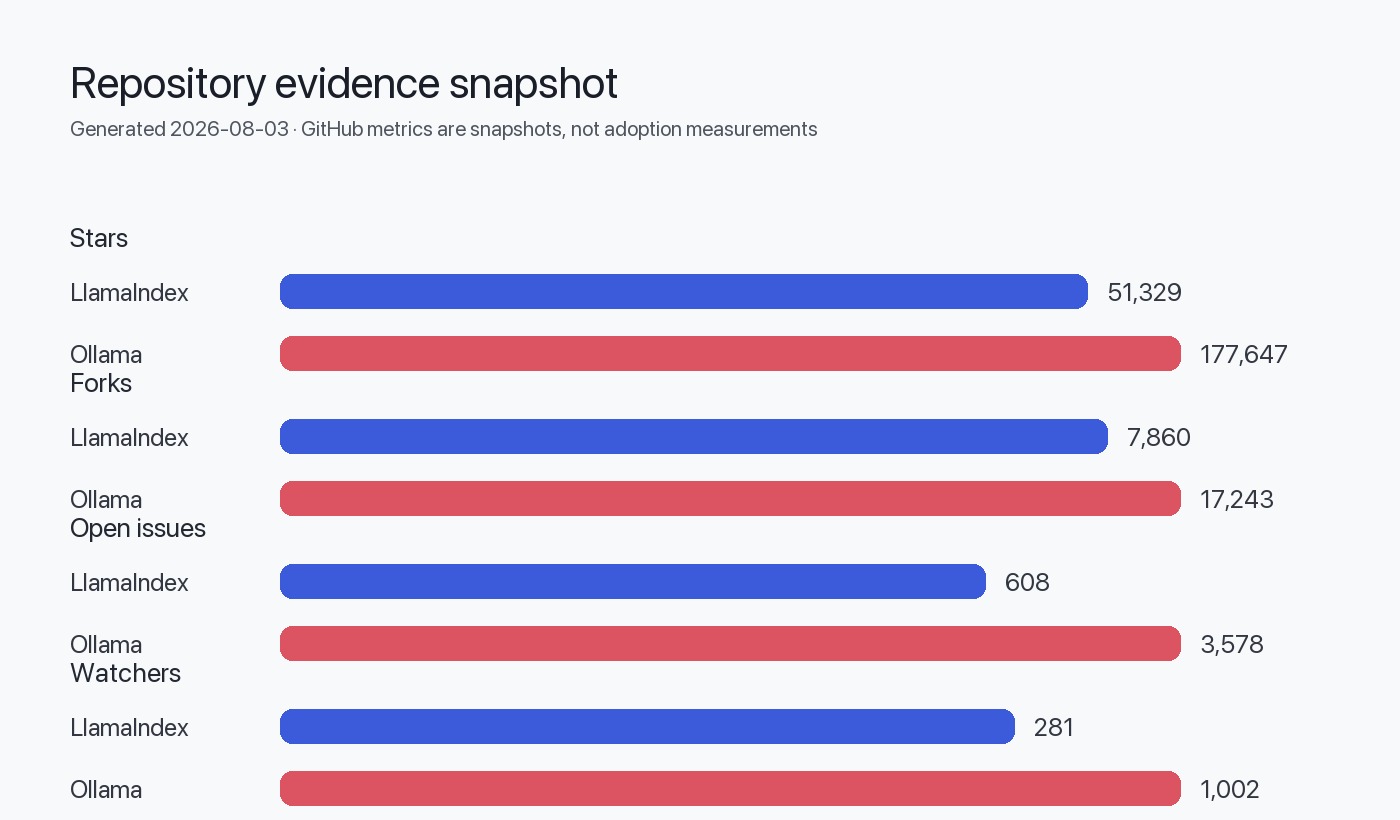
This comparison evaluates both tools using their February 2026 GitHub snapshots: LlamaIndex at 51.3k stars with 608 open issues, and Ollama at 177.6k stars with 3,578 open issues. Both projects are MIT-licensed and under active development.
Table of Contents
Architectural roles and scope
LlamaIndex and Ollama address separate concerns in LLM application development. LlamaIndex is a data orchestration framework that handles document ingestion, indexing, retrieval, and query orchestration. Ollama is an inference runtime that downloads, manages, and serves language models via a local API server.
LlamaIndex: Data framework and RAG orchestration
Based on the repository structure, LlamaIndex provides:
- Data connectors for 300+ integrations (APIs, PDFs, databases, vector stores)
- Indexing structures including vector stores, knowledge graphs, and document hierarchies
- Query engines with advanced retrieval patterns (hybrid search, reranking, routing)
- Agent frameworks through the
llama-index-corepackage and LlamaAgents subproject - LlamaParse platform for document parsing, extraction, and agentic OCR (separate commercial offering)
The framework is split into llama-index-core (base abstractions) and 300+ integration packages on LlamaHub. This modular design inferred from the README allows developers to install only required components:
from llama_index.core import VectorStoreIndex
from llama_index.llms.ollama import Ollama  # Integration package
Ollama: Local model runtime and inference server
Ollama, written in Go and using llama.cpp as its backend, focuses on:
- Model management with a registry at ollama.com/library
- REST API serving inference requests on
localhost:11434 - Multi-platform binaries for macOS, Windows, Linux, and Docker
- Hardware optimization leveraging Metal (macOS), CUDA (NVIDIA), and CPU backends
- Model quantization support for efficient local execution
The README shows Ollama as a runtime, not a framework. It does not handle document processing, retrieval logic, or orchestration—only model serving.
graph TD
    A[User Application] --> B[LlamaIndex Framework]
    B --> C[Data Connectors]
    B --> D[Vector Store]
    B --> E[Query Engine]
    E --> F[Ollama Runtime]
    F --> G[Local LLM]
    C --> H[Documents/APIs]
    D --> I[Embeddings]
Integration patterns and compatibility
LlamaIndex integration ecosystem
The LlamaIndex repository shows integration packages under llama-index-llms-* for multiple providers:
- OpenAI (default in examples)
- Ollama (
llama-index-llms-ollama) - Anthropic, Cohere, Google GenAI, AWS Bedrock (multiple provider packages)
Developers choose integrations at installation:
pip install llama-index-core
pip install llama-index-llms-ollama
pip install llama-index-embeddings-huggingface
The framework's latest release (v0.14.23) from June 2026 includes multimodal synthesis, workflow improvements, and ingestion pipeline optimizations. LlamaIndex supports any LLM provider that implements its LLM base class.
Ollama client libraries and API
Ollama provides official SDKs for:
- Python (ollama-python)
- JavaScript (ollama-js)
Third-party integrations exist for:
- LangChain (Python and JS)
- LlamaIndex (as shown in examples)
- Semantic Kernel, Spring AI, LiteLLM (ecosystem connectors)
The Ollama REST API uses OpenAI-compatible endpoints for /api/chat and /api/generate, enabling drop-in replacement in many tools. However, Ollama itself does not provide RAG, document processing, or agent capabilities—these require external frameworks like LlamaIndex.
Development workflow and deployment
LlamaIndex development patterns
LlamaIndex development centers on data pipelines and query orchestration. A typical workflow:
- Ingest documents using
SimpleDirectoryReaderor 300+ data connectors - Index data into a vector store or knowledge graph
- Configure retrieval with query engines, retrievers, or agents
- Integrate LLMs via provider-specific integration packages
From the README example:
from llama_index.core import Settings, VectorStoreIndex, SimpleDirectoryReader
from llama_index.llms.ollama import Ollama
from llama_index.embeddings.huggingface import HuggingFaceEmbedding

Settings.llm = Ollama(model="llama-3.1:latest", request_timeout=360.0)
Settings.embed_model = HuggingFaceEmbedding(model_name="BAAI/bge-small-en-v1.5")

documents = SimpleDirectoryReader("YOUR_DATA_DIRECTORY").load_data()
index = VectorStoreIndex.from_documents(documents)
query_engine = index.as_query_engine()
response = query_engine.query("YOUR_QUESTION")
Storage persistence requires manual handling:
index.storage_context.persist() # Saves to ./storageOllama deployment and operations
Ollama focuses on model lifecycle and inference serving. The workflow:
- Install Ollama via package manager or install script
- Pull models from the registry:
ollama pull gemma4 - Run server (starts automatically on install)
- Query via API or CLI:
ollama run gemma4
The README shows Docker deployment:
docker run -d -v ollama:/root/.ollama -p 11434:11434 --name ollama ollama/ollamaOllama handles model downloads, quantization selection, and GPU/CPU allocation automatically. However, it does not manage application state, document storage, or retrieval logic.
Performance and resource considerations
LlamaIndex performance characteristics
LlamaIndex performance depends on:
- Vector store backend (in-memory, Pinecone, Weaviate, ChromaDB, etc.)
- Embedding model (local HuggingFace vs. API-based)
- LLM provider (local Ollama vs. cloud APIs)
- Document volume and indexing strategy
The v0.14.23 release includes a performance optimization: "use a set instead of a list for within-batch dedup in Ingestion." This suggests prior bottlenecks in document processing pipelines.
LlamaIndex's overhead is primarily in retrieval and orchestration, not inference. Combining it with Ollama shifts compute to local hardware, trading API latency for local resource consumption.
Ollama resource requirements
Ollama's latest release (v0.32.5) from July 2026 notes MLX Metal bug fixes, indicating ongoing optimization for macOS GPU acceleration. Resource needs vary by model:
- 7B parameter models (e.g., Llama 3.1 8B): 8GB+ RAM, benefits from GPU
- 13B+ parameter models: 16GB+ RAM, GPU strongly recommended
- Quantized models (4-bit, 8-bit): Reduced memory footprint with quality trade-offs
Ollama automatically selects hardware backends (Metal, CUDA, CPU) but does not provide distributed inference. For high-concurrency scenarios, Ollama runs a single server process—scaling requires external load balancing or switching to multi-node inference solutions.
Comparative deployment footprint
| Aspect | LlamaIndex | Ollama |
|---|---|---|
| Runtime language | Python | Go |
| Base dependencies | ~50MB (core) + integrations | ~500MB binary + models |
| Model storage | Controlled by vector store | Local .ollama directory (multi-GB) |
| GPU requirements | Optional (depends on embeddings) | Recommended for inference |
| Concurrency | Framework-dependent | Single server process |
| Scalability pattern | Horizontal (multiple workers) | Vertical (GPU memory) |
Community and ecosystem maturity
LlamaIndex ecosystem
The LlamaIndex repository shows:
- 51,329 stars, 7,860 forks (as of August 2026)
- 608 open issues
- Created November 2022, pushed August 2026 (active)
- MIT license
- LlamaParse platform as a commercial extension
LlamaIndex is backed by a company (LlamaIndex, Inc.) offering enterprise products. The developers' site provides documentation for OSS framework, LlamaParse, and LlamaAgents.
The ecosystem includes 300+ integration packages, but this fragmentation means integration quality varies. The release notes show frequent dependency updates and integration fixes.
Ollama community and adoption
The Ollama repository shows:
- 177,647 stars, 17,243 forks (as of August 2026)
- 3,578 open issues
- Created June 2023, pushed July 2026 (active)
- MIT license
- Extensive third-party integrations (listed in README)
Ollama's 3.5x higher star count reflects its role as a widely adopted local inference runtime. The README lists 100+ community integrations across chat interfaces, IDEs, frameworks, and observability tools, indicating broad ecosystem buy-in.
However, the high open-issue count (3,578) suggests either maintenance challenges or a large backlog. Based on the latest release, active development continues with GPU optimization and bug fixes.
Decision matrix
| Criteria | LlamaIndex | Ollama | When It Matters |
|---|---|---|---|
| Primary purpose | RAG & data orchestration | Model runtime & inference | Determines if you need one or both |
| Inference provider | LLM-agnostic (OpenAI, Ollama, etc.) | Self-contained (local models) | Cloud vs. on-premise requirements |
| Document processing | Built-in (300+ connectors) | None (requires external framework) | RAG application necessity |
| Agent capabilities | Yes (LlamaAgents, workflows) | No (inference only) | Multi-step reasoning needs |
| Model management | None (delegates to LLM provider) | Built-in (pull, version, quantize) | Local model lifecycle control |
| Deployment complexity | Python app deployment | Binary + models (~GB storage) | Infrastructure and DevOps constraints |
| Hardware requirements | Framework overhead (CPU) | GPU-dependent (model inference) | Available compute resources |
| Data privacy | Depends on LLM provider choice | Fully local (no external calls) | Regulatory and compliance constraints |
| Scalability | Horizontal (framework-level) | Vertical (single process + GPU) | Concurrent user or query volume |
| Ecosystem maturity | 608 open issues, active releases | 3,578 open issues, high adoption | Risk tolerance and support needs |
Migration and coexistence strategies
Using LlamaIndex with cloud LLMs → Adding Ollama
If you have a LlamaIndex application using OpenAI or Anthropic, adding Ollama requires minimal code changes:
Before (OpenAI):
from llama_index.llms.openai import OpenAI
Settings.llm = OpenAI(model="gpt-4")
After (Ollama):
from llama_index.llms.ollama import Ollama
Settings.llm = Ollama(model="llama-3.1:latest", request_timeout=360.0)
Key considerations:
- Model capability differences: Local models may lack function calling, vision, or advanced reasoning
- Latency increase: GPU inference is slower than cloud API calls
- Embedding model: If using OpenAI embeddings, switch to
HuggingFaceEmbeddingfor full locality
Using Ollama directly → Adding LlamaIndex
If you have direct Ollama API calls without RAG, integrating LlamaIndex adds document processing:
Before (Ollama API):
import ollama
response = ollama.chat(model='gemma4', messages=[{'role': 'user', 'content': 'Why is the sky blue?'}])
After (Ollama + LlamaIndex):
from llama_index.core import VectorStoreIndex, SimpleDirectoryReader
from llama_index.llms.ollama import Ollama

Settings.llm = Ollama(model="gemma4")
documents = SimpleDirectoryReader("docs/").load_data()
index = VectorStoreIndex.from_documents(documents)
query_engine = index.as_query_engine()
response = query_engine.query("Why is the sky blue?")
This adds document ingestion, vector indexing, and retrieval-augmented generation without changing the inference backend.
Replacing LlamaIndex with custom code
LlamaIndex's modular architecture allows gradual replacement of components:
- Retrieval logic: Replace query engines with custom vector search
- Document processing: Use LangChain or custom parsers
- Agent framework: Migrate to LangGraph, CrewAI, or custom orchestration
However, LlamaIndex's 300+ integrations and abstractions (e.g., VectorStoreIndex, StorageContext) reduce boilerplate. Replacing it increases maintenance burden unless you need fine-grained control.
Replacing Ollama with cloud APIs
Ollama's OpenAI-compatible API simplifies migration:
# Change only the base URL and model name
from openai import OpenAI
client = OpenAI(base_url="http://localhost:11434/v1", api_key="ollama")  # Ollama
# client = OpenAI(api_key="sk-...")  # OpenAI
This swap is trivial in code but has operational implications:
- Cost: Free local inference → per-token API pricing
- Latency: Local GPU → network + cloud queue
- Privacy: Data leaves local environment
- Model choice: Limited local models → broader cloud model catalog
Project fit recommendations
Profile 1: Local-first RAG application
Requirements:
- Document ingestion from internal knowledge bases
- Retrieval-augmented question answering
- No data egress (compliance/privacy)
- Moderate query volume (<100 concurrent users)
Recommendation: LlamaIndex + Ollama
Rationale:
- LlamaIndex handles document parsing, vector indexing, and RAG orchestration
- Ollama provides fully local inference with no external API calls
- Combined footprint fits on a single GPU server (24GB+ VRAM for 13B models)
Trade-offs:
- Higher infrastructure cost (GPU hardware)
- Limited model selection vs. cloud APIs
- Slower inference than managed services
Example architecture:
from llama_index.core import VectorStoreIndex, SimpleDirectoryReader
from llama_index.llms.ollama import Ollama
from llama_index.embeddings.huggingface import HuggingFaceEmbedding

Settings.llm = Ollama(model="llama-3.1:latest")
Settings.embed_model = HuggingFaceEmbedding(model_name="BAAI/bge-small-en-v1.5")

documents = SimpleDirectoryReader("internal_docs/").load_data()
index = VectorStoreIndex.from_documents(documents)
index.storage_context.persist(persist_dir="./storage")
Profile 2: Chat interface without document context
Requirements:
- Conversational AI for customer support or internal tools
- No retrieval or document processing
- Low-latency responses preferred
- Cost-sensitive deployment
Recommendation: Ollama only
Rationale:
- No RAG requirements eliminate need for LlamaIndex
- Direct Ollama API calls reduce complexity
- Local deployment avoids per-token API costs
Trade-offs:
- Limited model capabilities (no function calling in many local models)
- Manual prompt engineering without framework abstractions
- Scaling requires load balancing multiple Ollama instances
Example usage:
import ollama

response = ollama.chat(
    model='gemma4',
    messages=[{'role': 'user', 'content': 'How do I reset my password?'}]
)
print(response['message']['content'])
Profile 3: Multi-agent system with external APIs
Requirements:
- Complex workflows with tool use and multi-step reasoning
- Integration with external APIs (CRM, databases, etc.)
- Production SLA requirements (99.9% uptime)
- Budget for cloud API costs
Recommendation: LlamaIndex + Cloud LLMs (OpenAI/Anthropic)
Rationale:
- LlamaIndex's agent framework (
LlamaAgents) and tool abstractions simplify orchestration - Cloud LLMs offer superior function calling, reasoning, and model variety
- Managed services reduce operational burden vs. local GPU clusters
Trade-offs:
- Higher per-query cost (API pricing)
- Data egress to third-party providers
- Latency depends on provider SLA
When to add Ollama:
- Use Ollama for development/testing to avoid API costs
- Hybrid deployment: Ollama for PII-sensitive queries, cloud for complex reasoning
Profile 4: Research or prototyping
Requirements:
- Rapid experimentation with different models and prompts
- Minimal infrastructure investment
- Flexibility to switch providers
- Single-user or small team
Recommendation: Ollama for inference, LlamaIndex optional
Rationale:
- Ollama's model management (
ollama pull,ollama list) accelerates iteration - Skip LlamaIndex if not testing RAG workflows
- Add LlamaIndex when prototyping retrieval or document-based applications
Trade-offs:
- Prototype code may require refactoring for production
- Local models may not reflect cloud model performance
Suggested workflow:
ollama pull llama-3.1:latest
ollama pull gemma4
ollama run llama-3.1 "Explain RAG architectures"
Evidence, assumptions, and limitations
Evidence base
This comparison relies on:
- GitHub repository metadata (stars, forks, issues, language, license) retrieved August 3, 2026
- README content from both repositories, synthesized rather than quoted
- Release notes for LlamaIndex v0.14.23 (June 2026) and Ollama v0.32.5 (July 2026)
- Code examples extracted from official README files
Key assumptions
Architectural inferences (labeled per editorial rules):
- LlamaIndex's modular package structure (
llama-index-core+ integrations) is inferred from README installation instructions and PyPI package naming - Ollama's single-process server model is inferred from README deployment examples and Docker usage; not explicitly stated as a scalability constraint
- The complementary relationship (LlamaIndex for orchestration, Ollama for inference) is demonstrated in LlamaIndex's own README examples
Not evaluated:
- Benchmark performance: No inference latency, throughput, or accuracy comparisons (per factual rules)
- Security posture: No CVE analysis; both projects are MIT-licensed OSS without published security audits in provided data
- Enterprise support: LlamaIndex offers LlamaParse commercially; Ollama support model not detailed in README
- Actual adoption metrics: GitHub stars reflect interest, not production deployment scale
Data freshness
Metrics retrieved August 3, 2026. Both projects show recent activity:
- LlamaIndex: Last push August 1, 2026
- Ollama: Last push July 31, 2026
Release versions and open-issue counts reflect August 2026 snapshots.
Decision checklist
Use this checklist to determine which tool(s) fit your project:
Choose LlamaIndex if:
Choose Ollama if:
Use both together if:
Consider alternatives if: