React and SuiteCRM: Practical Integration Guide
How to integrate React as a frontend for SuiteCRM: architecture, request/data flow, integration boundaries, deployment topology, observability, security, and a staged implementation plan.
Executive answer
React makes a robust, component-driven frontend that can be used to build a modern user interface for SuiteCRM. Using React as the presentation layer while keeping SuiteCRM as the authoritative CRM datastore and business-logic layer produces a coherent stack where responsibilities are separated: React handles UI state, rendering, and client-side interactions; SuiteCRM provides CRM data, workflow and persistence.
This guide lays out a practical integration architecture, request and data flow, clear integration boundaries, deployment topology, observability and security considerations, plus a step-by-step staged implementation plan you can follow. The guidance is grounded in the canonical repositories for both projects: the React repository and the SuiteCRM repository (sources cited below). Data used in this article was retrieved/generated on Sep 6, 2026.
Why pair React and SuiteCRM
- React is a component-based JavaScript library intended for building UIs; its repository and documentation note both client rendering and server rendering capabilities (React canonical repository, React latest GitHub release).
- SuiteCRM is an open-source CRM implemented in PHP and typically deployed on LAMP-style stacks; the SuiteCRM repository documents system requirements including Apache (or IIS), PHP 8.x, and MySQL/MariaDB (SuiteCRM canonical repository).
Note: the architectural conclusions below that rely on repository content or README descriptions are explicitly labeled as inferred where required.
Architecture overview
At a high level the stack separates concerns into these layers:
- Presentation: React application (SPA or server-rendered via Node) that runs in browsers and mobile webviews.
- Integration/Middleware: API gateway or middleware (Node/Express, or another backend-for-frontend) that maps frontend requests to SuiteCRM; handles authentication tokens, rate-limiting, schema translation, caching, and business-friendly APIs.
- CRM Backend: SuiteCRM running on PHP/Apache (or IIS) with a relational database (MySQL/MariaDB).
- Data store / persistence: the SuiteCRM-managed DB; any additional read-optimized store (Elasticsearch, Redis) is optional and external to SuiteCRM.
Inferred from READMEs: SuiteCRM's README lists PHP and MySQL/MariaDB and recommends a LAMP stack for hosting. That implies SuiteCRM will be deployed as a PHP web application behind Apache or IIS, and that integration should respect that hosting model (SuiteCRM canonical repository).
flowchart LR
  Browser[Browser / Client]
  ReactApp[React App (SPA or SSR)]
  BFF[Backend-for-Frontend (Node/Express) *optional*]
  Proxy[API Gateway / Reverse Proxy]
  SuiteCRM[SuiteCRM (PHP app)]
  DB[(MySQL / MariaDB)]
  Cache[(Redis / Memcached)]
  Search[(Elasticsearch) optional]

  Browser --> ReactApp
  ReactApp -->|HTTPS| Proxy
  Proxy --> BFF
  BFF -->|HTTP/HTTPS / API mapping| SuiteCRM
  SuiteCRM --> DB
  SuiteCRM --> Cache
  SuiteCRM --> Search
  Proxy --> SuiteCRM
Integration boundaries and patterns
Three common patterns for integrating React with SuiteCRM. Choose based on constraints (time-to-market, security, customization requirements):
- Direct UI overlay (least invasive)
- Serve React assets from the same domain as SuiteCRM or a subdomain. Use SuiteCRM-generated pages or templates to mount a React app inside existing SuiteCRM views.
- Pros: fast to start, can reuse SuiteCRM session state.
- Cons: tight coupling to SuiteCRM page structure and server-side templates.
- Inferred from README: SuiteCRM is built with PHP and templates, so embedding JS widgets is feasible (inference from repository structure).
- Backend-for-Frontend (recommended for moderate to large projects)
- Create a small Node.js BFF that exposes a stable, business-focused REST/GraphQL API consumed by React. The BFF translates client calls into SuiteCRM-compatible requests (or directly queries SuiteCRM database where appropriate), and handles auth, rate limiting, and response shaping.
- Pros: clean separation, easier to secure and evolve UI independently, offloads transformation logic from the browser.
- Cons: additional service to operate.
- Headless CRM (most decoupled)
- Treat SuiteCRM purely as an authoritative datastore and business engine. Expose SuiteCRM data via an API surface (official API if available, or a custom API layer), and build the React app against that API.
- Pros: full decoupling, enables multi-channel UIs (web, mobile).
- Cons: upfront work to build/secure API and ensure feature parity.
When the official SuiteCRM API surface is required, confirm its endpoints, authentication mechanisms, and rate limits in SuiteCRM documentation before implementation. This article does not assume an API exists beyond what is documented in the SuiteCRM repository; treat API availability as a design variable and verify it against SuiteCRM docs or installation.
Request and data flow (runtime)
Typical request flow for the BFF pattern (recommended):
- Browser requests a React route. If using SSR, Node/BFF can render; otherwise client-side React hydrates.
- React calls the BFF via HTTPS to request CRM data (lists, record details, search).
- BFF authenticates the request (session cookie, JWT, or other), applies ACLs and rate limits.
- BFF queries SuiteCRM via one of: SuiteCRM API (if available), an authenticated SuiteCRM session, or a controlled DB query layer. Responses are normalized and cached where appropriate.
- BFF returns JSON shaped for the UI; React renders components.
- For write operations, React sends action payloads to the BFF, which validates, maps to SuiteCRM operations (create/update), and returns status/results.
This flow keeps the browser free of direct database credentials and consolidates security rules and logging in the BFF.
Deployment topology and topology table
Below is a sample production deployment topology for a resilient setup.
| Component | Suggested deployment unit | Notes |
|---|---|---|
| React static assets | CDN (e.g., CloudFront, Cloudflare) | Serve built JS/CSS for performance and caching. |
| React SSR / BFF | Containerized Node.js service (Kubernetes or managed container) | Handles server rendering and API orchestration. |
| Reverse Proxy / Gateway | Nginx or API Gateway | TLS termination, routing, WAF rules. |
| SuiteCRM application | PHP-FPM behind Apache/Nginx, container or VM | Matches SuiteCRM recommendations for PHP/Apache hosting (SuiteCRM canonical repository). |
| Database | Managed MySQL/MariaDB | SuiteCRM expects MySQL/MariaDB per README. |
| Cache & Sessions | Redis | Session or cache offload for performance. |
| Monitoring & Logs | Prometheus, Grafana, ELK/Opensearch | Centralized observability. |
If you need fast iteration, start with React assets hosted on the same webserver as SuiteCRM and then move to a CDN + BFF as traffic and security needs increase.
Observability and telemetry
Observability should be implemented across these layers:
- Frontend telemetry: RUM (Real User Monitoring) to capture page load times, JS errors, and UX metrics.
- BFF / Node: request traces (distributed tracing headers), metrics (request rate, latency, error rate), and structured logs.
- SuiteCRM: PHP application metrics (response times, DB latency), and logs from PHP-FPM/Apache.
- Database: slow query logs, connection counts.
Table — Suggested metrics and what to watch:
| Layer | Key metrics | Alert conditions |
|---|---|---|
| Browser / React | FCP, LCP, JS errors, API error rates | Elevated JS error rate or increase in API 5xx errors |
| BFF / API | p95 latency, error rate, concurrency | p95 latency > SLA, error rate spike |
| SuiteCRM app | PHP response time, request queue length | High PHP queue/backlog |
| DB | slow queries, connections | Slow query spikes, connection exhaustion |
Security boundaries and recommendations
Security decisions must be conservative because SuiteCRM holds sensitive CRM data. The following recommendations are design guidance; verify each item against your organisation's policies.
- Network segmentation: Put SuiteCRM and its database in a private network; expose only the BFF/API and static CDN to the public internet.
- Least privilege: The BFF should authenticate and authorize every request; avoid embedding DB credentials in client-side code.
- TLS everywhere: Terminate TLS at the gateway and enforce encrypted connections between services.
- Secrets management: Use a secrets manager (Vault, cloud provider secret store) for DB credentials and API keys.
- Backups and DR: Ensure SuiteCRM database backups are automated and tested.
Do not allow browsers to directly access database ports or admin-only SuiteCRM endpoints. Any direct access to SuiteCRM internals from the client increases risk and bypasses centralized controls.
Staged implementation plan
This staged plan assumes a team that can operate both frontend and backend changes. Each stage has verifiable deliverables.
Stage 0 — Discovery (1–2 sprints)
- Audit your current SuiteCRM version and hosting (verify PHP, DB, and webserver versions from deployment and SuiteCRM canonical repository).
- Identify which SuiteCRM screens and workflows need a React UI.
Stage 1 — Proof of Concept (1 sprint)
- Build a small React SPA that reads a non-sensitive dataset (e.g., public contacts) from a mock BFF. Serve the SPA from a simple static host or from the SuiteCRM server for convenience.
- Validate routing, build process, and authentication UX.
Stage 2 — Minimal BFF and read-only integration (2–3 sprints)
- Implement a lightweight Node.js BFF that proxies authenticated read requests to SuiteCRM or to a verified API surface.
- Implement caching and a strict schema for data returned to React.
- Add frontend components to render lists and details.
Stage 3 — Writes, validation and security hardening (2–4 sprints)
- Add create/update/delete flows using the BFF.
- Implement server-side validation, audit logs, and role-based access control.
- Harden TLS, secrets, and apply rate limiting.
Stage 4 — Performance, observability, and rollout (ongoing)
- Add RUM, tracing, and dashboards.
- Move static assets to CDN, scale BFF horizontally, and introduce canary deploys.
Stage 5 — Extended capabilities
- Optionally introduce search indexes or dedicated reporting stores if SuiteCRM and traffic patterns indicate a need.
Action checklist
Decision checklist
- Does your organisation require strict separation between UI and CRM logic? If yes, prefer BFF or headless.
- Are there existing SuiteCRM templates you must keep? If yes, an overlay approach may be faster.
- Do you need server rendering for SEO or initial load time? If yes, use React SSR via Node in the BFF.
- Is there an official SuiteCRM API available and supported for your version? If available, prefer it over direct DB access. (Verify against SuiteCRM docs.)
Evidence, assumptions, and limitations
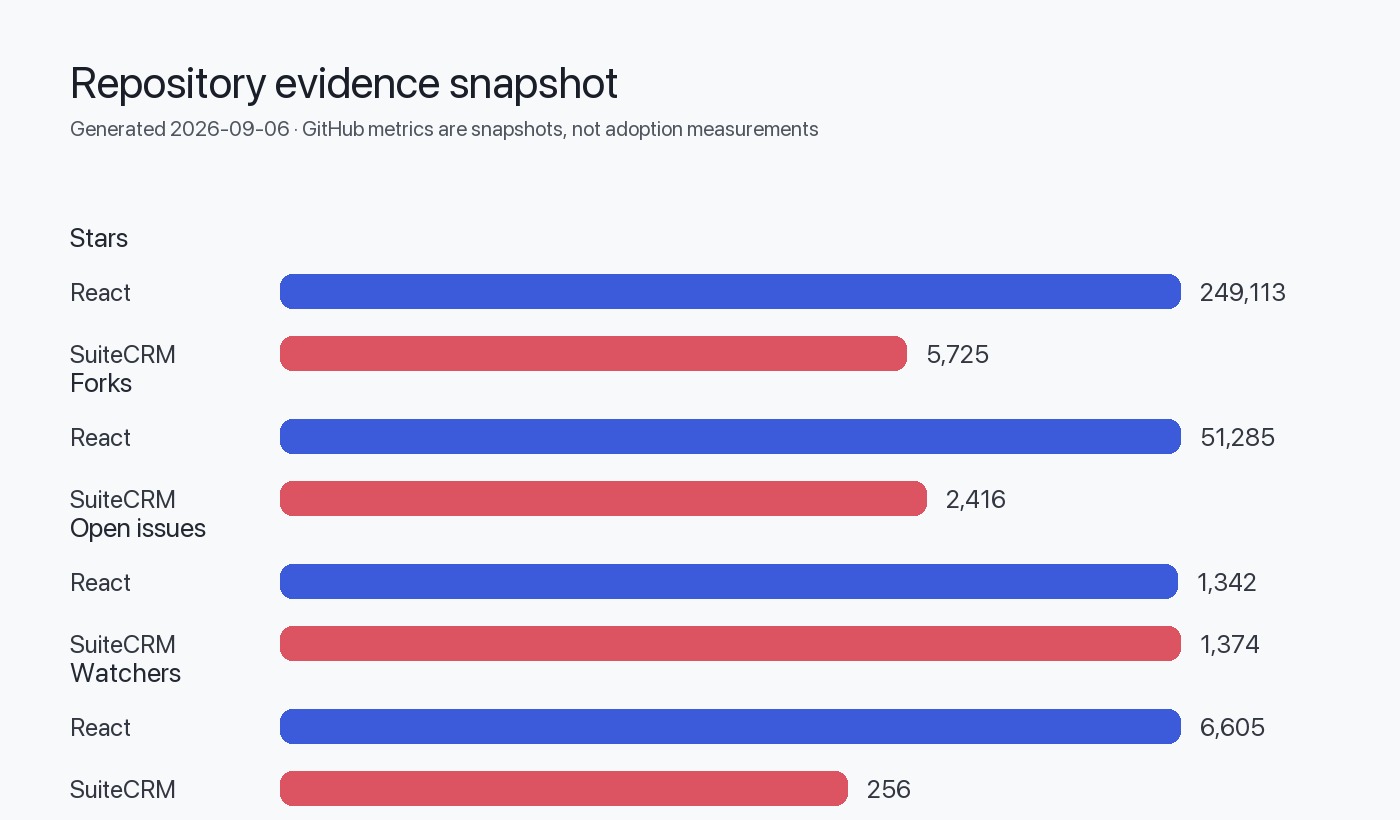
- React repository and release data referenced from the React canonical repository and latest release (React canonical repository, React latest GitHub release). The React README explicitly mentions that React can render on the server and be used in client and native contexts; use that capability where SSR is required.
- SuiteCRM repository README contains the project description, system requirements and guidance for LAMP-style hosting; this informs deployment guidance (SuiteCRM canonical repository).
Explicit assumptions and limitations:
- Assumption (inference): SuiteCRM is typically deployed as a PHP application on Apache or IIS with MySQL/MariaDB backend; this is based on the SuiteCRM README and labeled as an inference above. Confirm the exact runtime environment and available API surfaces in your deployed SuiteCRM instance before implementation.
- Limitation: This guide does not assume the presence or shape of any particular SuiteCRM API beyond what is documented in SuiteCRM sources; you must confirm endpoint availability, authentication methods, and rate limits in your SuiteCRM installation or documentation.
- Limitation: Performance numbers, traffic characteristics, and exact scaling thresholds are organisation-specific and are not provided here.
Sources
- React canonical repository: https://github.com/react/react
- React latest GitHub release: https://github.com/react/react/releases/tag/v19.2.8
- SuiteCRM canonical repository: https://github.com/SuiteCRM/SuiteCRM
FAQ
How do I authenticate users between React and SuiteCRM?
Use the BFF to centralize authentication. The BFF should validate user credentials or tokens and maintain sessions or issue JWTs to the client. Confirm your SuiteCRM deployment's authentication mechanisms and integrate the BFF accordingly; do not expose database credentials to the client.
Can React replace SuiteCRM's UI entirely?
Yes, but replacing the entire UI is a significant project. A phased approach (overlay → BFF → headless) reduces risk. Verify required SuiteCRM features and workflows and plan to replicate or proxy required server-side behaviors.
Is it safe to query the SuiteCRM database directly from the BFF?
Direct DB access is possible but increases coupling and risk. Prefer an official API if available; if you must use DB access, encapsulate queries in a controlled data layer inside the BFF and apply strict input validation and least-privilege credentials.
Do I need server-side rendering (SSR) for React in this stack?
SSR is useful if you require faster first paint or better SEO for public-facing pages. If your UI is an authenticated internal app, a client-rendered SPA may be sufficient. React's README notes server rendering is supported; use SSR when it meets your UX or performance requirements (React canonical repository).
What monitoring is most important for early detection of issues?
Start with frontend error tracking (JS exceptions), BFF error rates and latency, SuiteCRM PHP errors, and DB slow queries. Add distributed tracing to link frontend requests to CRM backend operations for end-to-end visibility.
Are there licensing considerations when combining React and SuiteCRM?
React is MIT-licensed per its repository. SuiteCRM is AGPL-3.0 per its repository. Ensure your usage and distribution comply with these licenses; seek legal counsel for redistribution or SaaS scenarios.
How do I validate data schema differences between React models and SuiteCRM entities?
Maintain a single source of truth for schema translations inside the BFF. Use runtime validation (JSON Schema or a typed layer) to validate data shapes coming from SuiteCRM before passing to the UI.