Migrating from WooCommerce to Saleor: Decision & Plan
Step-by-step migration guidance for teams evaluating moving a store from WooCommerce (WordPress plugin) to Saleor (headless GraphQL). Includes compatibility risks, phased plan, test strategy, data/API considerations, rollback gates, and when migration is not justified.
Executive answer
If you run a WordPress-based ecommerce site using the WooCommerce plugin and you need a headless, API-first commerce backend with a GraphQL API and composable extension model, moving to Saleor can be technically appropriate. The decision depends primarily on whether you need to leave the WordPress runtime, replace PHP/plugin-based extensions with an API/app model, and accept the operational overhead of deploying a separate Python-based service stack.
This guide helps you decide and execute a migration: it documents suitability criteria, how to build an inventory of features and integrations, compatibility risks grounded in the repositories, a phased migration plan, tests and rollback gates, and clear cases where migration is not justified. All repository facts cited here are drawn from the canonical GitHub sources listed in Sources; this article was produced using repository metadata and READMEs available at generation time (data generated: Sep 6, 2026).
Platform snapshot (evidence)
- WooCommerce (source: official repository): packaged as a WordPress plugin inside a monorepo, implemented in PHP, and distributed via the plugin system. Repository: woocommerce/woocommerce.
- Saleor (source: official repository): described as an API-only, GraphQL-native commerce platform implemented in Python with an emphasis on headless APIs and composability. Repository: saleor/saleor.
Architectural conclusions inferred from READMEs or repository structure:
- Inferred: WooCommerce is structured as a WordPress plugin monorepo and relies on the WordPress runtime and plugin extension model (inferred from the WooCommerce repository layout and README).
- Inferred: Saleor is API-first and GraphQL-native, intended as a headless commerce backend (inferred from the Saleor README and topics).
Caveat: these are inferences based on repository READMEs and structure, cited above.
Suitability assessment: when migrating makes sense
Use Saleor if your priorities include one or more of the following:
- You need a language-agnostic frontend(s) or multiple channels that consume a GraphQL API (Saleor positions itself as headless and GraphQL-native; see the Saleor README).
- You require an API-first, composable commerce core where custom logic runs outside the core (Saleor README emphasizes apps, webhooks, and API extensions).
- You want to separate presentation from backend to scale, deploy, or rewrite storefronts independently.
Stick with WooCommerce if any of these apply:
- Your business depends heavily on the WordPress ecosystem: many plugins, themes, and site-specific PHP customizations that are impractical to reimplement.
- You have a small team or shop that benefits from WordPress-managed hosting, plugin-based features, and minimal operational complexity.
Inventory: what to catalog before you decide
Create a precise inventory. At a minimum, include:
- Data model: product types, attributes, variants, categories, custom product fields, SKUs, images, and metadata.
- Business logic: pricing rules, discounts, subscriptions, order flows, tax logic, shipping rules.
- Integrations: payment gateways, tax providers, accounting, shipping carriers, PIM, marketplaces, analytics, CRM.
- Extensions and custom code: WordPress plugins, PHP hooks, shortcodes, theme templates, and any direct DB schema modifications.
- Operational surface: hosting (WordPress/PHP/MySQL), backups, CDN, SSL, monitoring, CI/CD, developer skills.
Embed the supplied data image here to help stakeholders visualize the inventory snapshot.
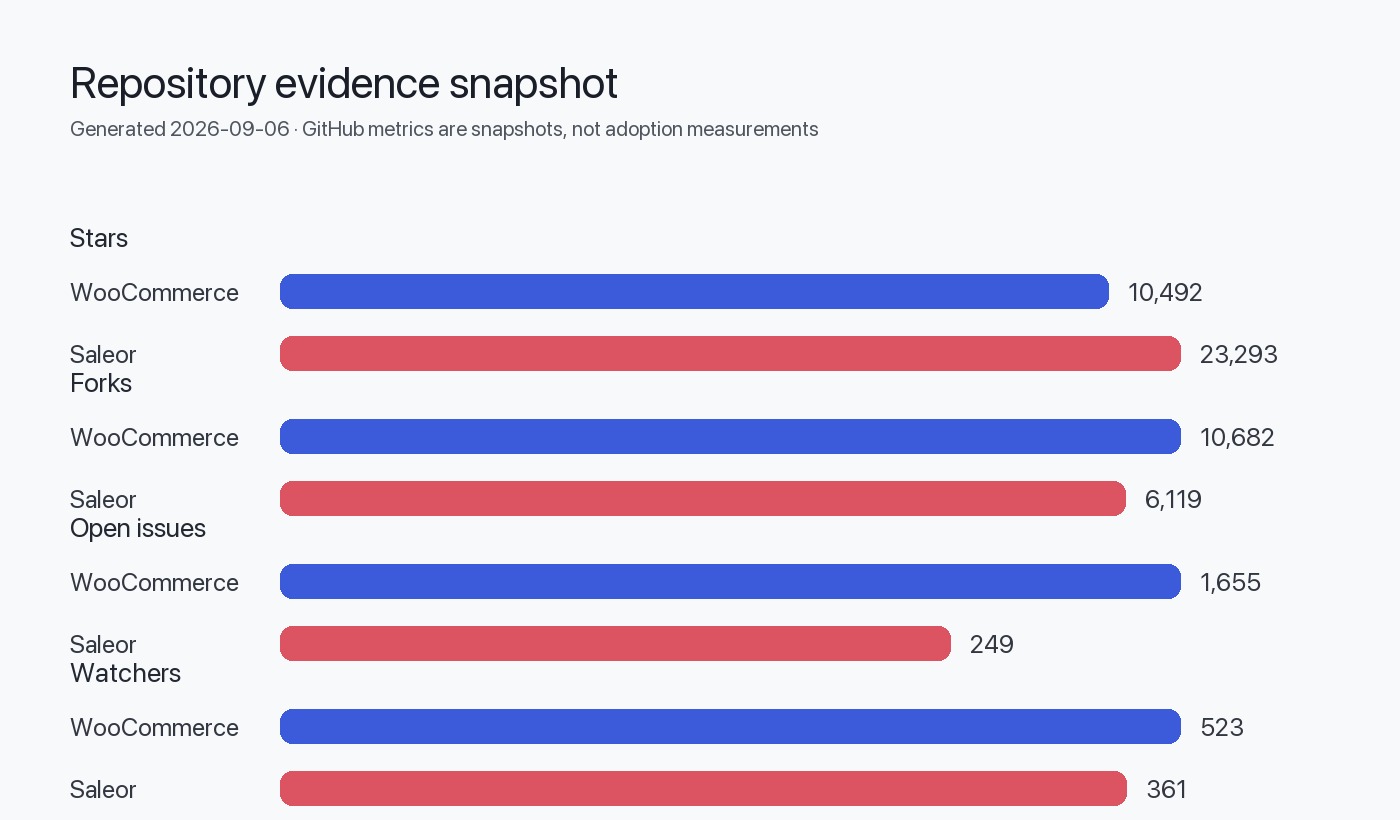
Table 1 — Minimum inventory fields (use this as a checklist):
| Inventory area | Data to capture | Owner | Success criteria |
|---|---|---|---|
| Products & catalog | SKUs, variants, attributes, images, metadata | Catalog owner | All unique SKUs and attributes mapped to Saleor model |
| Orders & history | Order states, refunds, payment IDs | Ops | Historical orders accessible for reporting and customer service |
| Integrations | Gateway credentials, webhook endpoints | Integrations lead | Live gateways tested on a sandbox Saleor instance |
| Extensions | Plugin list, custom PHP code, shortcodes | Dev lead | Each extension classified: reimplement, replace, or deprecate |
| Hosting & infra | Backups, DB size, peak traffic | SRE | Production parity plan for scaling and failover |
Compatibility risks and mapping
Key compatibility considerations you must map explicitly:
- Runtime and language: WooCommerce runs inside WordPress/PHP; Saleor is a Python service. Language/runtime migration requires rewriting or replacing PHP customizations.
- Extension model: WooCommerce uses WordPress plugin mechanisms; Saleor uses an API/app model (Saleor README states extensibility via apps, webhooks, and API extensions — architecture inferred from repository content).
- API style: WooCommerce historically exposes REST endpoints or relies on WordPress hooks; Saleor exposes GraphQL as the primary API (inferred from the Saleor README and topics). That implies client-side code or middleware must be reworked to talk GraphQL.
- Data model gaps: Product metadata or custom fields implemented via WordPress postmeta may not map 1:1 to Saleor’s product model and metadata approaches.
- Third-party integrations: Plugins that connect to payment or shipping providers may not have direct equivalents; you’ll need to confirm vendor-side API support or implement connectors.
Table 2 — Compatibility risk matrix (high-level):
| Risk category | Why it matters | Likely mitigation |
|---|---|---|
| Custom PHP hooks & plugins | Business rules embedded in PHP won't run after migration | Reimplement as Saleor apps, middleware, or cloud functions; prioritize by business criticality |
| Theme-dependent UI | WordPress theme logic won’t apply to headless frontends | Rebuild storefront as a separate frontend (React/Next.js or other stack) that consumes Saleor GraphQL API |
| Data model mismatches | Postmeta and serialized fields may be hard to map | Normalize and transform during migration; add metadata fields in Saleor where needed |
| Real-time workflows | WP cron or plugin jobs may need new scheduling | Use background workers, Celery, or cloud functions integrated with Saleor events |
Phased migration plan (recommended)
This plan intentionally separates discovery, prototyping, and staged cutover to limit risk.
High-level phases:
- Discovery & inventory (complete the inventory table above).
- Proof-of-concept (PoC): implement a narrow slice (catalog sync + storefront read) on Saleor.
- Parallel integration: implement major integrations (payments, shipping) and a customer sync strategy.
- Data migration & reporting: move historical orders/clients for reporting and CS access.
- Pilot & shadow traffic: run both systems in parallel for a subset of traffic/customers.
- Cutover & decommission: switch live traffic and retire WordPress/WooCommerce as appropriate.
Decision and execution timeline should be driven by risk, not by arbitrary dates: prioritize smallest critical path that proves the model.
Example migration phase table:
| Phase | Key tasks | Success criteria | Gate to proceed |
|---|---|---|---|
| PoC (2–4 weeks typical) | Deploy Saleor dev instance, seed 100 SKUs, build simple storefront reading GraphQL | Frontend retrieves catalog correctly; basic checkout flow simulated | Team approves PoC and confirms core APIs exist |
| Integrations | Implement payment sandbox, shipping API connectors, authentication | Transactions can be created in sandbox; webhooks deliver expected events | Integration tests green for core flows |
| Data migration | Map product, customer, and order models; run dry-runs | Data integrity checks pass on sample datasets | Data migration tests pass thresholds (e.g., counts, hash checks) |
| Pilot | Route small percentage of traffic or select customers to Saleor | No critical business failures for pilot cohort; monitoring shows expected behavior | Stakeholders approve full cutover plan |
Test strategy and verification
Testing must cover functional correctness, data fidelity, performance targets, and operational readiness. Key test types:
- Unit and integration tests for any new connectors and business logic reimplemented as apps.
- End-to-end tests for checkout, payment, refunds, and order lifecycle (use sandbox gateways where possible).
- Data validation tests that compare record counts, sums (sales, taxes), and spot-check rows between source and target databases.
- Acceptance tests for storefronts: navigation, product pages, cart flows, and account management.
- Load and smoke tests for deployment pipelines and autoscaling behavior.
Define success metrics per test (pass/fail) and automate tests in CI where possible. Keep a short feedback loop for rollbacks.
Mermaid diagram — high-level migration flow:
flowchart LR
  A[Discovery & Inventory] --> B[PoC: Catalog + Storefront]
  B --> C{PoC OK?}
  C -- yes --> D[Integrations & Data Mapping]
  C -- no --> B
  D --> E[Pilot & Shadow Traffic]
  E --> F{Pilot OK?}
  F -- yes --> G[Cutover]
  F -- no --> D
  G --> H[Decommission & Post-mortem]
Data and API concerns (detailed)
- Data extraction: export product, order, and customer data from WordPress/WooCommerce. The repository metadata indicates WooCommerce is a plugin within a WordPress monorepo; exact export mechanisms depend on your installation and cannot be universally extracted from the repository alone. Plan for custom export scripts where the plugin stack or custom DB fields are used.
- Data transformation: map WordPress postmeta or serialized fields to Saleor product attributes and metadata. Ensure unique SKU constraints and variant normalization.
- Incremental sync: implement a robust delta strategy (webhooks, change logs, or timestamp-based sync) to keep the running Saleor instance in sync during pilot phases.
- API approach: Saleor exposes GraphQL as the canonical API (inferred from Saleor README and topics). Client code must be rewritten or migrated to consume GraphQL; a middleware adapter can translate REST-style calls into GraphQL if desired.
Rollback gates and validation checks
Define clear gates that require explicit approval before advancing:
- PoC gate: PoC must demonstrate catalog retrieval and simulated checkout flows; if failing, rollback is to stop work and refine design.
- Integration gate: Payment and shipping in sandbox must operate without data loss; if webhooks fail or payments are inconsistent, halt and rollback deployments.
- Data migration gate: Dry-run migration must pass integrity checks (row counts, checksum of financial totals for a sampling window). If integrity fails, abort full migration.
- Pilot gate: Metrics for pilot cohort must meet availability and error thresholds (decided by business). If thresholds are exceeded, route pilot traffic back to WooCommerce and investigate.
Create an automated rollback procedure: DNS/traffic switches, feature flags, and a deployment pipeline that redeploys the WordPress stack or routes traffic back to the original endpoints.
Cases where migration is not justified
Common scenarios where staying on WooCommerce is the more pragmatic choice:
- Heavy dependence on premium or bespoke WordPress plugins that provide business-critical capabilities without equivalent APIs or straightforward reimplementation paths.
- Small-scale shops where the operational cost of running and maintaining a separate Saleor service outweighs the benefits of headless architecture.
- Projects that require immediate, low-cost feature delivery through WordPress themes or plugin extensions; the migration rewrite overhead creates unacceptable delays.
If these apply, consider hybrid approaches instead of full migration: keep WooCommerce for admin/order processing and implement selective headless frontends that read catalog data from WooCommerce or maintain a thin sync layer.
Action checklist (Decision checklist)
Evidence, assumptions, and limitations
- WooCommerce repository metadata and README content: github.com/woocommerce/woocommerce (readme includes monorepo description, prerequisites, and structure). See latest release data referenced in repository metadata.
- Saleor repository metadata and README content: github.com/saleor/saleor (readme describes Saleor as GraphQL-native and API-only; repository topics include "graphql" and "headless").
Assumptions and limitations:
- This guide does not access your live WooCommerce installation. Any technical specifics about your site (custom tables, bespoke plugins, hosting specifics) must be discovered during the inventory phase.
- Architectural conclusions labeled as "inferred" are derived from README and repository structure; verify them against product documentation and installed versions.
- The repository metadata (stars, language, releases) cited here reflect the snapshots available at generation time. Data generation timestamp: Sep 6, 2026. Validate against the live repositories for the freshest details.
Sources
- WooCommerce canonical repository: https://github.com/woocommerce/woocommerce
- WooCommerce latest GitHub release: https://github.com/woocommerce/woocommerce/releases/tag/11.1.0
- Saleor canonical repository: https://github.com/saleor/saleor
FAQ
What are the biggest technical differences between WooCommerce and Saleor?
WooCommerce is delivered as a WordPress plugin running on PHP within the WordPress runtime (inferred from the WooCommerce repository structure). Saleor is presented as an API-first, GraphQL-native backend implemented in Python and intended to be headless (inferred from the Saleor README and repository topics).
Do I need to rewrite all my WooCommerce custom code?
Most custom PHP code and WordPress plugin logic will need reimplementation or an adapter layer because Saleor does not run inside WordPress. Assess each customization during inventory to decide whether to reimplement as a Saleor app, middleware, or keep in WordPress and integrate via sync.
Can I migrate data incrementally?
Yes. The recommended approach is to implement incremental syncs (delta updates) during a pilot phase, using webhooks or timestamp-based exports. Full cutover should wait until integrity checks and pilot metrics pass.
How long does a migration typically take?
This guide does not provide time estimates because effort depends entirely on your plugin footprint, customizations, and integrations. Use the PoC to bound effort for larger phases.
Will SEO be affected when moving to a headless frontend?
SEO implications depend on the chosen frontend implementation. A headless frontend can be implemented with server-side rendering or prerendering to preserve SEO behavior; plan this as part of the storefront rebuild.
Is there a hybrid alternative to a full migration?
Yes. You can keep WooCommerce for admin/order processing and implement a separate headless frontend that reads catalog data; or maintain a sync layer that copies catalog data to Saleor for public-facing APIs while keeping WooCommerce live.
Who should own the migration project?
Cross-functional ownership is required: product for requirements, engineering for implementation, operations for deployment and monitoring, and legal/finance for payment and compliance checks. Assign a single project lead to coordinate gates and stakeholder sign-offs.