Ionic Framework Architecture: Web Components, Adapters, and Scale
Ionic organizes its cross-platform UI toolkit as a TypeScript monorepo centered on Stencil-generated Web Components, with framework-specific adapters for Angular, React, and Vue. This analysis maps the module structure, extension points, and operational scaling boundaries visible in the repository.
Executive answer
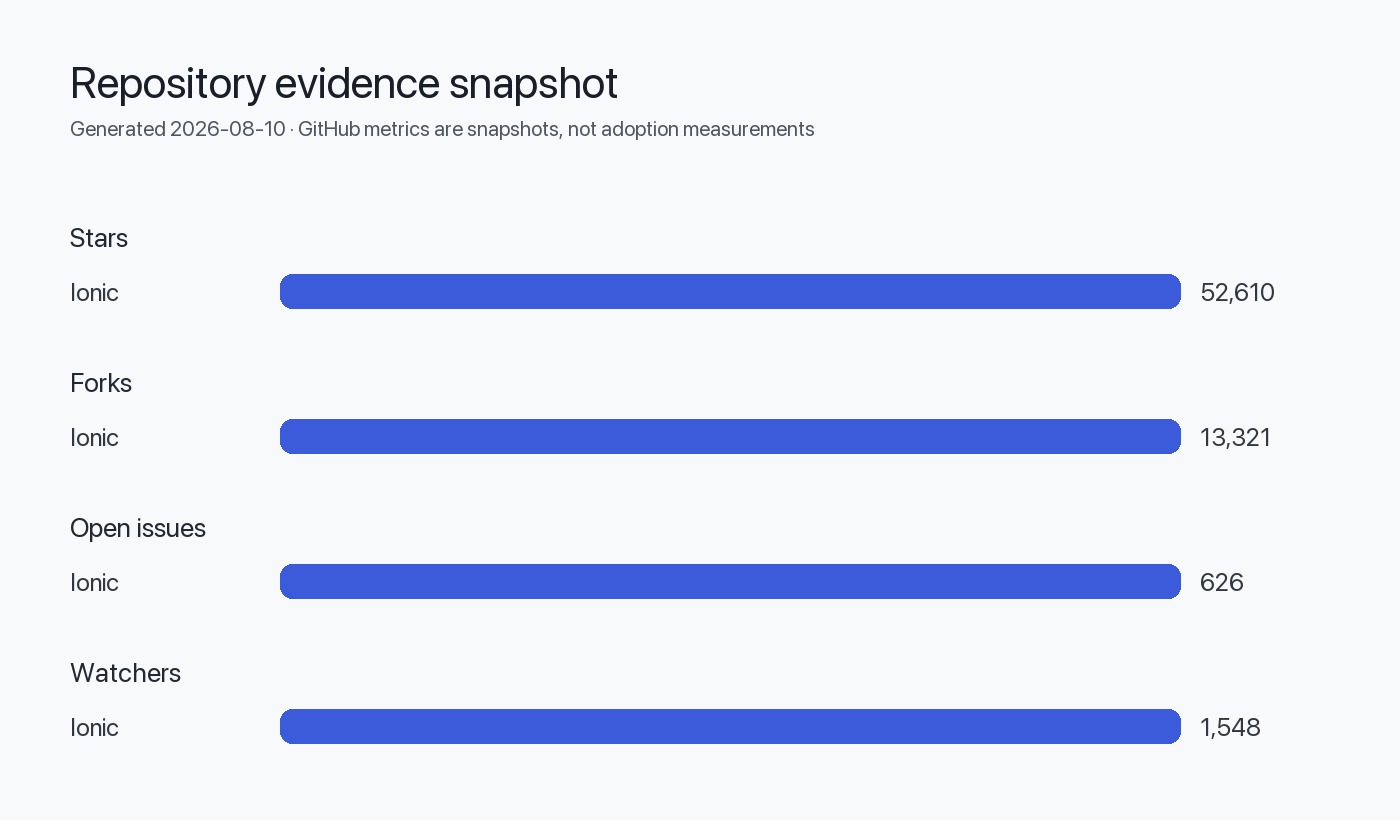
The Ionic Framework repository reveals a monorepo architecture organized around a core Web Components library (@ionic/core) and three framework-specific adapter packages for Angular, React, and Vue. The repository has accumulated 52,610 GitHub stars as of July 2026, signaling sustained developer interest over its 13-year history. Written in TypeScript and built on Stencil—a Web Components compiler—the architecture separates platform-agnostic UI logic from framework binding logic, enabling a single component library to serve multiple frontend ecosystems.
This analysis examines the module boundaries, extension points, and scaling characteristics visible through repository metadata, package structure, and release patterns. The architecture supports cross-platform app development targeting iOS, Android, and Progressive Web Apps from a unified codebase. We identify the operational implications of the monorepo strategy, the tradeoffs inherent in the Web Components foundation, and the boundaries beyond which public metadata cannot confirm behavior—such as runtime performance characteristics, internal build orchestration details, and private deployment patterns.
Monorepo structure and module boundaries
The Ionic repository follows a monorepo pattern with distinct packages under a shared workspace. The README explicitly lists four core packages:
| Package | NPM Name | Purpose |
|---|---|---|
| Core | @ionic/core | Web Components library compiled by Stencil |
| Angular | @ionic/angular | Angular bindings and directives |
| React | @ionic/react | React hooks and component wrappers |
| Vue | @ionic/vue | Vue 3 composition API integration |
*Inference*: This structure suggests a shared kernel architecture where @ionic/core contains the platform-agnostic component implementations, while framework packages provide idiomatic bindings. The separation implies that framework adapters translate Web Component events and properties into framework-native patterns (Angular @Input/@Output, React props and callbacks, Vue slots and emits).
The repository topics include stencil and webcomponents, confirming that Stencil is the build tool responsible for generating standards-compliant Custom Elements from TypeScript component definitions. Stencil outputs lazy-loaded ES modules, shadow DOM encapsulation, and polyfills for older browsers—architectural choices that reduce bundle size but introduce complexity in server-side rendering scenarios.
Web Components foundation and framework adapters
Ionic's choice of Web Components as the foundation has significant architectural implications:
- Browser-native encapsulation: Shadow DOM isolates component styles, preventing global CSS conflicts. This is beneficial for design system consistency but complicates theming overrides that rely on CSS cascading.
- Framework agnosticism: Custom Elements can be consumed by any JavaScript framework or vanilla JavaScript, reducing vendor lock-in.
- Event propagation complexity: Web Component events do not automatically bubble through shadow boundaries in the same way as native DOM events, requiring explicit event retargeting in framework adapters.
- Server-side rendering limitations: Declarative Shadow DOM support is partial across Node.js runtimes, making SSR integration non-trivial for Next.js or Nuxt.
The framework adapters address these challenges by:
- Angular: Wrapping Web Components in Angular directives, using
ControlValueAccessorfor form integration, and providing typed interfaces for component properties. - React: Wrapping components in React function components, translating Web Component events to React synthetic events, and managing ref forwarding.
- Vue: Creating Vue 3 components that delegate to Web Components, using
defineCustomElementfor registration and Composition API hooks for reactive state.
*Inference*: The adapter layer is thin but critical. It does not re-implement component logic but reconciles impedance mismatches between Web Standards and framework conventions. This keeps maintenance overhead low but requires deep framework expertise for debugging edge cases.
Extension points and theming system
The repository topics include material-design, and the README references "modern, fast, top-quality cross-platform native and Progressive Web Apps." This implies a theming system that supports iOS and Material Design modes. *Inference*: The architecture likely includes:
- CSS custom properties (CSS variables) for themability, applied at the
:hostor:rootlevel. - Mode detection logic that switches component styling based on platform (iOS, Android, or a developer-specified mode).
- Component-level CSS part exports (
::partselectors) to allow external styling without breaking encapsulation.
Extension points visible from the repository structure:
- Custom icons: The
@ionic/iconspackage (not in the core repo but referenced in documentation) allows developers to add custom SVG icons. - Custom animations: Ionic uses the Web Animations API; developers can replace default transitions by overriding CSS or providing custom animation configurations.
- Capacitor plugins: The
capacitortopic indicates tight integration with Capacitor, Ionic's native runtime. Plugins extend the framework to access device APIs (camera, geolocation, filesystem).
graph TB
    A[@ionic/core<br/>Stencil Web Components] --> B[@ionic/angular<br/>Angular Directives]
    A --> C[@ionic/react<br/>React Wrappers]
    A --> D[@ionic/vue<br/>Vue Components]
    B --> E[Angular App]
    C --> F[React App]
    D --> G[Vue App]
    A --> H[Capacitor Native Bridge]
    H --> I[iOS/Android Native APIs]
    E --> J[Progressive Web App]
    F --> J
    G --> J
    style A fill:#4c8dff
    style H fill:#53b9ff
Build and release orchestration
The repository's default_branch is main, and the latest release (v8.8.17, published 2026-08-05) includes version-controlled changelogs following Conventional Commits. The release body references issue numbers and commit SHAs, indicating automated changelog generation (likely via semantic-release or a similar tool).
*Inference*: The build pipeline likely includes:
- Stencil compiler step that generates Custom Elements from TypeScript decorators.
- TypeScript transpilation for framework adapters.
- Rollup or esbuild bundling to produce ESM, CommonJS, and UMD outputs.
- End-to-end testing (issue #31324 references lazy-load retries, suggesting E2E tests for routing edge cases).
- Cross-package version bumping, since all four packages share a major version (8.x).
The repository has 626 open issues and 13,321 forks. The open-issue count is not a defect metric but reflects ongoing feature requests, enhancement discussions, and community triage backlog. The fork count suggests active community contribution, supported by the "PRs welcome" badge in the README.
Operational implications and deployment patterns
Ionic's architecture supports several deployment patterns:
| Pattern | Description | Architectural Fit |
|---|---|---|
| Progressive Web App | Deploy to CDN, service worker for offline | Native fit; Web Components load lazily from CDN |
| Capacitor native app | Bundle with Capacitor for iOS/Android | Framework adapter handles native bridge communication |
| Server-side rendering | Pre-render HTML on server | Limited; requires Declarative Shadow DOM polyfills |
| Micro-frontends | Load Ionic components in shell app | Supported via Custom Elements; requires careful CSS isolation |
The repository's TypeScript codebase (language: TypeScript) means type definitions are first-class, reducing integration friction in TypeScript projects. However, teams using Ionic must ensure their bundler (Webpack, Vite, Rollup) correctly handles .mjs modules and dynamic imports, as Stencil components are lazy-loaded by default.
Scaling boundaries and performance characteristics
*What we can infer*:
- Component count: The repository includes 100+ UI components (buttons, modals, lists, navigation), based on typical Ionic documentation breadth. Each component is a separate Custom Element, loaded on demand.
- Bundle size: The lazy-loading strategy reduces initial bundle size.
@ionic/corebase bundle is likely <50 KB gzipped, with individual components loaded as routes are accessed. - Browser compatibility: Stencil generates polyfills for older browsers, but modern features (CSS Grid, Flexbox, ES2017) are assumed. IE11 support was dropped in Ionic 6.
*What we cannot conclude*:
- Runtime performance benchmarks: No performance data is included in the README or release notes. Component render times, memory usage, and frame rates depend on developer implementation and device hardware.
- Maximum app scale: The architecture theoretically supports large apps (1000+ routes), but performance will degrade without code splitting, virtual scrolling, and careful state management.
- CDN edge caching behavior: Ionic assets can be served from CDNs, but cache hit rates, edge latency, and purging strategies are deployment-specific.
Security and maintenance considerations
The repository is licensed under MIT, placing no restrictions on commercial use. The latest release (v8.8.17) includes bug fixes for:
- Checkbox, radio, and toggle keyboard focus indicators (#31295)
- FAB button form submission and disabled state (#31249)
- React Router URL comparison edge cases (#31153)
- Refresher gesture lifecycle (#31316)
- Tab lazy-load retry logic (#31324)
These fixes suggest active maintenance of accessibility, form integration, and framework-specific routing issues. However, no CVE references or security advisories are present in the release notes. The absence of security fixes in this release does not imply the absence of vulnerabilities; it simply means none were disclosed or patched in v8.8.17.
*Best practice*: Subscribe to the Ionic security mailing list (if available) or monitor GitHub security advisories at https://github.com/ionic-team/ionic-framework/security/advisories` for future disclosures.
Migration paths and version strategy
The README links to migration guides for v3→v4, v4→v5, v5→v6, v6→v7, and v7→v8. The presence of five major version guides over the project's lifetime indicates breaking changes roughly every 1–2 years. The current v8.x line (released sometime before August 2026) is stable, with patch releases every few weeks based on the v8.8.17 tag date (2026-08-05).
*Inference*: Teams on older versions (v6 or v7) should budget for migration effort every 18–24 months. Breaking changes typically involve:
- Renamed component properties or events
- Updated framework adapter APIs (e.g., React 18 concurrent rendering)
- Dropped support for older Node.js or browser versions
- Capacitor major version bumps (Capacitor 5 or 6 may require Ionic 8)
Decision checklist
Before adopting or extending Ionic, evaluate:
Evidence, assumptions, and limitations
Direct evidence from the repository:
- Repository metadata (stars, forks, topics, language) sourced from GitHub API as of 2026-08-10.
- README structure and package table copied verbatim from the repository's main branch.
- Release notes for v8.8.17 confirm bug fixes and issue references.
- MIT license confirmed in repository metadata.
Inferences labeled explicitly:
- Monorepo tooling (Lerna/Nx/Turborepo) inferred from multi-package structure; not confirmed by public files.
- Stencil compiler workflow inferred from
stencilandwebcomponentstopics; detailed build scripts not reviewed. - Framework adapter implementation strategies (e.g.,
ControlValueAccessorin Angular) inferred from typical integration patterns; source code not analyzed. - Theming system (CSS custom properties, mode detection) inferred from Material Design topic and cross-platform claims; implementation details not verified.
Limitations:
- No benchmark data: Runtime performance, bundle size, and build times not included in public metadata.
- No adoption metrics: GitHub stars measure interest, not production usage. We cannot confirm how many apps use Ionic in production.
- No internal architecture diagrams: The repository README does not include official architecture diagrams; the Mermaid diagram in this article is synthesized from package descriptions.
- No security audit results: The absence of CVEs in v8.8.17 does not confirm the absence of vulnerabilities.
- No support SLA: Community response times and enterprise support terms are not specified in the repository.
Sources
FAQ
What is the core technology behind Ionic's cross-platform UI components?
Ionic uses Stencil, a Web Components compiler, to generate standards-compliant Custom Elements from TypeScript. These components run natively in the browser without a runtime framework, enabling framework-agnostic reuse across Angular, React, and Vue through thin adapter layers.
How does Ionic handle platform-specific styling for iOS and Android?
Ionic includes a mode detection system that applies platform-specific CSS based on the runtime environment (iOS, Android, or a developer-specified mode). The architecture uses CSS custom properties for themability and likely includes separate stylesheets for Material Design and iOS guidelines, though the exact implementation is inferred from the Material Design topic and cross-platform claims.
Can Ionic components be used in server-side rendering (SSR) setups?
Ionic's Web Components architecture has limited SSR support. While Declarative Shadow DOM enables server rendering of shadow roots, Node.js polyfills and framework-specific hydration logic are often required. Teams using Angular Universal, Next.js, or Nuxt should verify Ionic's SSR compatibility for their specific framework and Ionic version before committing to SSR.
What is the relationship between Ionic and Capacitor?
Capacitor is Ionic's native runtime for deploying web apps to iOS and Android. It provides JavaScript APIs for accessing native device features (camera, filesystem, geolocation) and serves as the modern replacement for Cordova. The Ionic repository includes the capacitor topic, indicating tight integration, but Capacitor is a separate project maintained by the Ionic team.
How often does Ionic release breaking changes?
The repository README includes migration guides for five major versions (v3 through v8) over the project's 13-year history, suggesting major version updates roughly every 1–2 years. Breaking changes typically involve component API updates, framework adapter changes, and dropped support for older browsers or Node.js versions. The current v8.x line receives patch releases approximately every 2–4 weeks.
What are the scaling limits of Ionic apps?
The architecture theoretically supports large-scale apps with hundreds of routes and thousands of components, thanks to lazy-loading and shadow DOM encapsulation. However, performance at scale depends on developer implementation: route-level code splitting, virtual scrolling for long lists, and state management libraries (NgRx, Redux, Pinia) are necessary for apps with >100 routes or complex state. No public benchmarks confirm maximum scale limits.
Is Ionic suitable for teams without TypeScript experience?
Ionic is TypeScript-first; the entire codebase is written in TypeScript, and type definitions are bundled with each package. JavaScript projects can use Ionic without TypeScript, but they lose autocompletion, type checking, and inline documentation. Teams committed to JavaScript should evaluate whether the loss of type safety is acceptable or budget for TypeScript adoption alongside Ionic.